As a merchant, you know the drill. A customer initiates a return, and almost immediately, the questions start flooding your inbox: “Has my return arrived yet?” “When will I get my refund?” “Where is my package?”
These “Where Is My Return?” queries take up valuable support time and can create anxiety for your customers.
Today, we are thrilled to announce a major update to Synctrack Returns that solves this problem once and for all: Return Shipment Tracking.
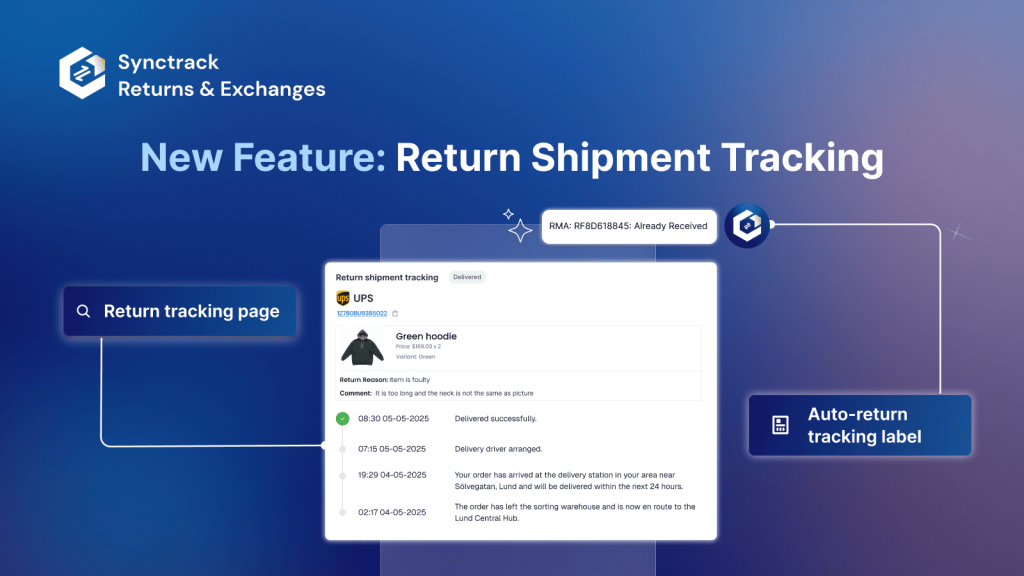
With this new feature, the “black hole” of return logistics is officially closed. You and your customers can now track every milestone of a return shipment in real-time, directly within the Synctrack ecosystem.
✅ See the real-time status of return shipments – including Pre-shipment, Shipped, Delivered, and Received stages – both you and your merchants
✅ Answer “Where is my return?” quickly and confidently
✅ Reduce support workload with clear logistics visibility
✅ Improve your internal workflow using one centralized dashboard
Tracking is available both at the return request level and for the return label shipment, giving you insights into the journey from every angle.

We’ve designed this feature to provide visibility at every layer of the return process. We distinguish between two types of statuses to give you the most accurate data possible:
| Status | What it means |
| No Prepaid Label | RMA is approved, but the label hasn’t been generated. |
| Pre-shipment | Label is created, but the carrier hasn’t scanned it yet. |
| Shipped | The package is officially in transit. |
| Delivered | The package has reached its destination. |
| Received | Your team has marked the item as physically received at the warehouse. |
| Status | What it means |
| Info Received | Carrier is notified and ready for pickup. |
| In transit | The package is moving through the carrier network. |
| Out for delivery | The carrier is about to deliver the shipment. |
| Available for pickup | The package has arrived at a pickup point and is ready for collection. |
| Failed attempt | The carrier attempted delivery but failed. They will usually try again. |
| Exception | The shipment met with an exception event like held by customs, undelivered, or returned to the sender. |
| Delivered | The shipment was delivered successfully. |
Setting up Return Shipment Tracking takes less than a minute.
Navigate to the Return Tracking section in your Synctrack Returns admin.
Toggle the status to “Enable Tracking.”
Once active, statuses will automatically populate on the RMA Detail Page (for you) and the Return Page (for your customers).
Note: This feature is exclusively available for our Premium and Enterprise plan users.
To celebrate this launch and help you gear up for the busy post-holiday return season, we’re offering a special promotion.
Get 20% OFF all plans for your first 3 months!
Code: RD_BFCM_MCD
Deadline: Valid until 23:59 on December 31, 2025 (UTC+7).
Need help setting things up or want a quick walkthrough of the new dashboard? Our team is standing by. Reply to this post or ping us via the live chat in your app dashboard.