Every Shopify merchant knows PayPal takes a cut. But here’s what most don’t realize: you might be paying up to 5.5% on PayPal orders instead of 3.5%. That extra 2%? It’s Shopify’s third-party fee-and it’s completely avoidable.
One Reddit merchant discovered this the hard way, watching thousands disappear before figuring out the fix. The Shopify PayPal fee structure has two layers, and missing one costs you real money. This guide shows you exactly where your fees go and how to cut them. Keep reading to stop overpaying today.
PayPal remains one of the most trusted payment methods online. Millions of shoppers worldwide have PayPal accounts linked to their bank or credit cards, making checkout incredibly fast and convenient.
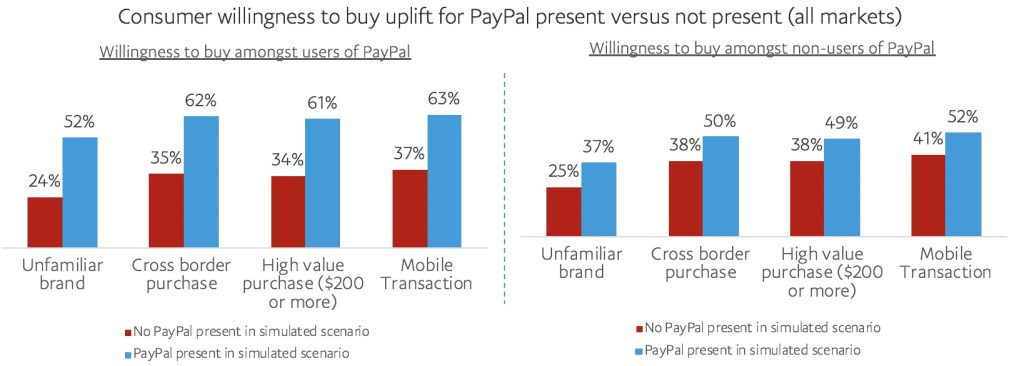
According to PayPal’s own research, 54% of consumers are more willing to buy from an unfamiliar online store when PayPal is available at checkout. Even more telling: 59% of PayPal users have abandoned a purchase because PayPal wasn’t an option. That’s potential revenue walking out the door simply because you didn’t offer their preferred payment method.
Think about it from your customer’s perspective. They’ve never heard of your store before. They’re not sure if you’re legitimate. But they see PayPal at checkout, and suddenly they feel protected. If anything goes wrong, PayPal has their back. That peace of mind converts browsers into buyers.
For Shopify merchants, offering PayPal brings several clear benefits:
The trade-off? Fees. PayPal charges more than some other payment methods. But if those fees help you capture sales you’d otherwise lose, they’re worth it.
Setting up PayPal on your Shopify store typically takes around 10 minutes. Shopify automatically creates a basic PayPal Express Checkout link using your sign-up email. But you’ll need to finish the setup to receive payouts.
Many new store owners skip this step and wonder why their first PayPal payment sits unclaimed. Don’t make that mistake. Complete the setup before your first sale.
Follow these steps to complete your Shopify PayPal payments setup:
Important note: Shopify uses PayPal Express Checkout for integration. The older PayPal Standard method is no longer supported. Express Checkout is faster, more reliable, and works better with modern storefronts.
PayPal takes a cut from every transaction you process. The exact amount depends on your location, the customer’s location, and the payment method used. Understanding these fees helps you price products correctly and forecast your actual profit margins.
PayPal updated their fee structure in recent years, moving from the classic 2.9% + $0.30 to higher rates for most transaction types. Many merchants still operate under the old assumptions and end up surprised by their actual costs.
Here’s the current Shopify PayPal fee breakdown for U.S. merchants:
| Transaction Type | Fee |
| Standard Online Checkout | 3.49% + $0.49 |
| Venmo, Apple Pay via PayPal | 2.59% + $0.49 |
| International Transactions | Base rate + 1.5% additional |
| Micropayments (under $10) | 5% + $0.05 (requires application) |
| Chargeback/Dispute Fee | $15-$20 per dispute |
Let’s say you sell a $100 product to a U.S. customer who pays through PayPal. PayPal takes 3.49% ($3.49) plus $0.49. That’s $3.98 total, leaving you with $96.02.
For international sales, the math changes. If a customer from Europe buys that same $100 product, PayPal adds the 1.5% international fee. Now you’re looking at roughly 5% ($4.99) plus the fixed fee. Your take-home drops to around $94.50.
The fixed fee ($0.49 in the U.S.) hurts more on small orders. On a $10 sale, that $0.49 represents nearly 5% of the order by itself. If you sell lots of small items, consider applying for PayPal’s micropayments rate, which drops the fixed fee to $0.05.
PayPal adds another layer of fees when currencies don’t match. If your PayPal account is in USD but a customer pays in EUR, PayPal converts the money and takes a 3-4% cut on the exchange rate.
You can avoid this by holding multiple currency balances in PayPal and withdrawing strategically. Or, match your Shopify store currency to your main customer base to minimize conversions.
This is where many merchants get confused and lose money unnecessarily.
Shopify has a third-party transaction fee that applies when you use payment gateways other than Shopify Payments. This fee ranges from 0.5% to 2%, depending on your plan. And yes, it applies to PayPal orders.
But here’s the key: If you have Shopify Payments enabled on your store, Shopify waives this fee for PayPal transactions. You only pay PayPal’s fees, not Shopify’s extra cut.
| Shopify Plan | Fee Without Shopify Payments | Fee With Shopify Payments |
| Basic | 2% | 0% |
| Shopify | 1% | 0% |
| Advanced | 0.5% | 0% |
A merchant on Reddit shared that they were paying 5.5% in total fees on PayPal orders. They couldn’t figure out why the fees seemed so high compared to what PayPal advertised.

The answer was simple: they were on a Basic plan and hadn’t enabled Shopify Payments. So they paid PayPal’s ~3.5% fee PLUS Shopify’s 2% third-party fee. That’s 5.5% gone from every PayPal sale.
On $10,000 in monthly PayPal sales, that extra 2% costs $200. Over a year, that’s $2,400 that could have stayed in their pocket just by turning on Shopify Payments.
The best approach for most stores is to use both. They serve different purposes and different customers. But understanding how they compare helps you make smart decisions about where to focus your checkout optimization efforts.
Shopify Payments is Shopify’s built-in payment processor powered by Stripe. It handles credit and debit card payments directly on your checkout page. PayPal redirects customers to complete payment on PayPal’s platform. Each has advantages depending on your customers and business model.
Shopify Payments fees range from 2.4% + $0.30 (Advanced plan) to 2.9% + $0.30 (Basic plan) for online credit card transactions. The percentage drops as you move to higher Shopify plans because Shopify rewards merchants who commit to bigger subscriptions.
PayPal charges 3.49% + $0.49 for standard checkout. That’s about 0.6% higher on the percentage and nearly double on the fixed fee compared to Shopify Payments on Basic plans.
On a $50 order:
The difference is about $0.48 per $50 order. Not huge, but it adds up. On 1,000 orders, that’s $480 in extra fees.
Shopify Payments keeps customers on your site throughout the entire checkout process. They enter card details directly on your checkout page without any redirects. This creates a smoother, more branded experience that generally converts better. Customers never leave your store or see another company’s interface.
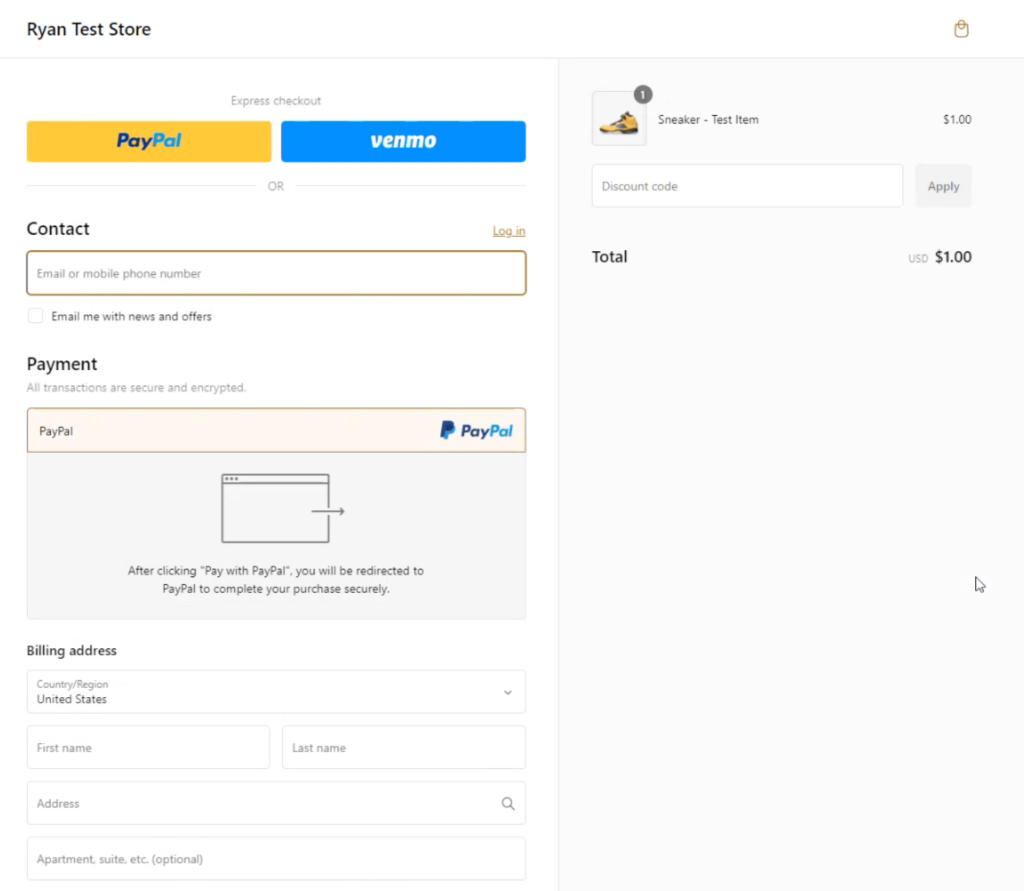
PayPal works differently. It redirects customers to PayPal’s site (or opens a pop-up window) to log in and confirm payment. Then they return to your store to see the order confirmation. This extra step can be a pro or a con, depending on your customers.
Some customers prefer the PayPal redirect because they trust PayPal more than an unfamiliar store. Seeing the familiar PayPal interface makes them feel secure. Others find the extra step annoying and might abandon checkout if the redirect feels too slow or confusing.
Watch your analytics. If you see lots of drop-offs at the PayPal stage, consider adding text near the checkout encouraging customers that card payments are also accepted securely. Sometimes people default to PayPal, but would happily use their card if they noticed the option.
PayPal gives you immediate access to funds. The money hits your PayPal balance right when customers pay. You can withdraw it to your bank or use it directly.
Shopify Payments transfers funds on a schedule, typically every 2-4 business days. New stores might wait up to 7 days for initial payouts. The trade-off is automatic deposits to your bank account without any extra steps.
Enable Shopify Payments AND offer PayPal. Here’s why this works:
Even if 90% of your customers choose PayPal, keeping Shopify Payments active costs nothing and saves you 0.5-2% on every PayPal transaction.
Payment fees eat into your profits, but you can minimize the damage. These aren’t theoretical suggestions-they’re proven strategies that successful Shopify merchants use to keep more money from each sale.
Some of these tips require just a few clicks in your settings. Others need more thought about your pricing and business model. Start with the easy wins and work your way through the list.
This single step saves you 0.5-2% on every PayPal order. Even if you never take a credit card payment through Shopify Payments, having it active removes Shopify’s third-party transaction fee. It costs nothing to turn on.
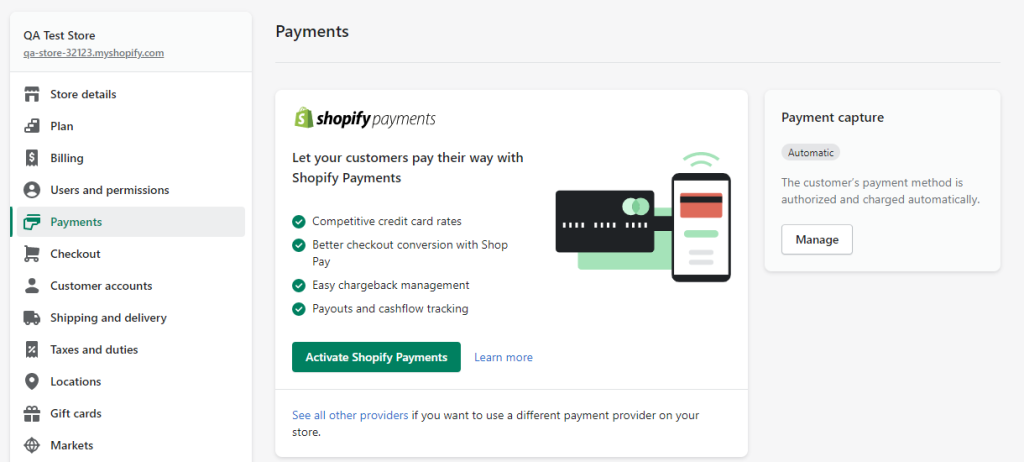
If you can’t use Shopify Payments (because of your country or industry), higher Shopify plans charge lower third-party fees. Basic charges 2%, Shopify charges 1%, Advanced charges 0.5%. At high volumes, upgrading your plan might pay for itself in fee savings.
If you process significant volume (tens of thousands monthly), contact PayPal about merchant rate discounts. They don’t advertise this openly, but negotiated rates exist for larger sellers. The worst they can say is no.
Set your Shopify store currency to match your PayPal account currency and your main customer base. Each conversion costs 3-4% on top of regular fees. If you sell globally, consider holding multiple currency balances in PayPal and withdrawing strategically.
Selling items under $10? PayPal’s micropayments rate charges 5% + $0.05 instead of 3.49% + $0.49. On a $5 sale, that’s $0.30 versus $0.66-nearly half the fee. Apply through your PayPal account settings.
Calculate your average fee percentage and adjust product prices to compensate. If fees average 3.5%, raising prices by 3-4% keeps your margins intact. Don’t add a separate “PayPal fee” at checkout-this looks bad and might violate terms of service. Just price appropriately from the start.
PayPal’s fixed fee ($0.49) costs the same whether someone spends $10 or $100. Bundling products, offering free shipping thresholds, or volume discounts encourages bigger purchases. One $100 order costs $0.49 in fixed fees. Two $50 orders cost $0.98. Small difference, but it compounds.
Check Shopify’s reports to see what percentage of orders use PayPal versus cards. If PayPal dominates but costs significantly more, you might promote card payment options more prominently. Display credit card logos clearly. Some customers default to PayPal but would happily use cards if they noticed the option first.
Fees aren’t the only thing eating into your PayPal profits. Fund holds, disputes, and account reserves can lock up your cash flow for weeks-sometimes longer.
Here’s what happens without proper tracking sync: PayPal holds your funds because they can’t verify you actually shipped the order. A customer gets impatient waiting for updates and files a dispute. Now you’re dealing with a $15-$20 dispute fee on top of the original transaction cost. Worst case? Too many disputes trigger account limits that freeze thousands of dollars.
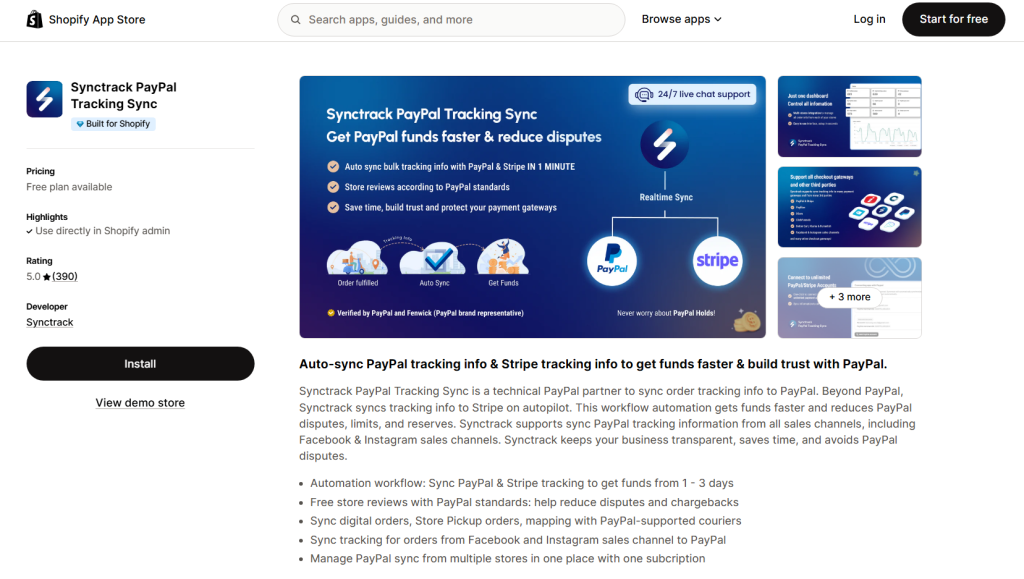
Synctrack PayPal Tracking Sync solves this by automatically sending tracking information to PayPal the moment your orders ship. No manual uploads. No forgotten updates. Just seamless automation that keeps PayPal happy and your money flowing.
Synctrack helps prevent this cycle before it starts:
There is extra help if you have more than one Shopify store. Synctrack lets you manage PayPal sync for all of them from a single dashboard with one subscription. No jumping between accounts or paying multiple fees.
Synctrack doesn’t stop at PayPal. It also syncs tracking information to Stripe automatically. Same benefits-faster fund releases and fewer disputes-across both major payment processors.
These questions come up constantly among Shopify merchants. Getting clarity on these points helps you make better decisions about your payment setup.
Technically, you can add surcharges in some regions, but it’s generally not recommended. PayPal’s terms restrict this in many cases, and checkout surprises cause abandoned carts. Customers who see unexpected fees at the last step often leave and never come back. Better to build fees into your base pricing where they’re invisible.
PayPal keeps the fixed fee portion when you refund a transaction. On a $100 refund, you get back the percentage part but lose the $0.49. Shopify Payments handles this similarly. Neither platform refunds processing fees completely. This is something to factor in if you have a high return rate-those fees add up.
Because it eliminates their third-party transaction fee on your PayPal orders. Shopify wants you using their payment system, so they incentivize it by waiving fees on other gateways when you have Shopify Payments active. It’s a smart move on their part, and it benefits you too-you save 0.5-2% on every PayPal sale.
In most countries, payment processing fees count as legitimate business expenses. Keep detailed records of what you pay-it reduces your taxable income at year end. Your accounting software or Shopify’s reports should track this automatically. Consult with a tax professional for your specific situation.
PayPal charges a dispute fee of $15-$20 if a customer opens a claim against your transaction. You’ll need to provide evidence that you fulfilled the order correctly. If you lose, you lose both the payment and the fee. If you win, you keep the payment but might still lose the fee depending on the situation. Keep shipping records and tracking numbers to protect yourself.
PayPal fees are a cost of doing business, but they’re manageable when you understand how they work. The merchants who struggle are usually the ones who set up payments incorrectly or don’t realize they’re paying more than necessary.
That said, PayPal brings trust, convenience, and global reach to your store. Many customers won’t buy without it. The fees might seem annoying, but they’re likely bringing in sales you’d otherwise lose.
The stores that succeed aren’t the ones chasing the absolute lowest fees. They’re the ones that understand their costs, price accordingly, and focus on driving sales rather than obsessing over every fraction of a percent. Get your setup right, enable Shopify Payments, and let PayPal do what it does best – convert hesitant shoppers into paying customers.
The key points to remember: