Running an online store means dealing with one harsh reality: nearly 76% of shoppers abandon their carts before completing a purchase. The culprit? Often, it’s a clunky checkout experience or missing payment options.
Here’s the good news. When you offer Shopify payments methods that customers actually want to use, you can flip that script entirely. Stores using accelerated checkout options like Shop Pay have seen conversion rates jump by up to 50%. That’s a massive difference for any business. So which Shopify payments options should you enable? And what’s the best Shopify payment method for your specific store? Let’s break it all down.
The Two Main Ways Shopify Handles Payments
Shopify gives you two primary paths for accepting payments:
- Shopify Payments is the platform’s built-in solution, powered by Stripe. It lets you accept cards, digital wallets, and local payment methods without any third-party setup.
- Third-party gateways are external providers like PayPal, Authorize.net, or Adyen that you can connect to your Shopify checkout. There are over 100 options available.
Most successful stores use a combination of both. Here are 11 payment types you should know about:
- Credit and debit cards
- Cash on delivery (COD)
- Mobile wallets
- Buy now, pay later (BNPL)
- Checks
- Bank transfers
- Autopay (recurring billing)
- Cryptocurrency
- Rewards or points
- QR code payments
- Digital payment links
Each method comes with different fees, settlement times, and risk levels. Here’s a quick comparison to help you decide which ones make sense for your store:
| Payment Method |
Processing Fees |
Speed of Payment |
Dispute Risk |
Best For |
| Credit and debit cards |
1%–3.5% depending on card type |
1–3 business days |
High: Chargebacks are common |
Everyday e-commerce; higher-value orders |
| Cash on delivery (COD) |
No processing fees |
Instantly upon delivery |
Low once collected |
Regions with low card adoption |
| Mobile wallets (Apple Pay, Google Pay) |
Similar to cards (~1%–3%) |
Instant auth; 1–3 days to settle |
Medium: tied to card disputes |
Mobile-first shoppers; fast checkout |
| Buy now, pay later (BNPL) |
Higher fees (2%–8%) |
Merchant paid upfront |
Provider handles disputes |
Younger buyers; higher-ticket items |
| Checks |
Bank fees may apply |
Slow: several days to clear |
High: fraud and bounce risk |
B2B orders; legacy customers |
| Bank transfer (ACH, wire) |
Flat fees ($15–$50 for wires) |
1–5 business days |
Low: direct bank-to-bank |
Large B2B purchases; international orders |
| Autopay (recurring billing) |
Standard card or bank fees |
Automated on the billing cycle |
Medium: unexpected charge disputes |
Subscriptions and memberships |
| Cryptocurrency |
Variable network fees |
Fast: minutes to hours |
Very low (irreversible) |
Tech-savvy audiences; avoiding FX fees |
| Rewards or points |
Indirect cost to revenue |
Instant redemption |
Low: non-monetary |
Loyalty programs; repeat purchases |
| QR code payments |
Same as linked method |
Real-time confirmation |
Medium: depends on linked method |
Pop-ups, events, offline-to-online |
| Digital payment links |
Standard fees for linked method |
Fast once clicked |
Medium: can be disputed |
Social selling; invoices; D2C orders |
Where Shopify Payments Falls Short
While Shopify Payments offers plenty of advantages, it’s not perfect for every merchant. Here are the key limitations you should know before relying on it as your only payment solution.
Geographic limitations
Shopify Payments only works in about 20 countries, including the US, Canada, UK, Australia, and most of Western Europe. If you’re based in Southeast Asia, Africa, or much of South America, you’ll need to use a third-party gateway.
Payment preferences vary widely around the world. Credit cards might feel standard in the US, but in other markets, mobile wallets, bank transfers, or even cash on delivery are more popular.
Understanding these regional differences helps you localize your checkout, reduce cart abandonment, and build trust with international customers.
Shopify Payments Methods In The United States
Digital wallets now lead online transactions in the US. In 2024, mobile wallets made up 37% of ecommerce transaction value-and that number is expected to hit 52% by 2027. Credit cards followed at 32%, with debit cards at 19%. Together, these three methods cover nearly 90% of all online payments.
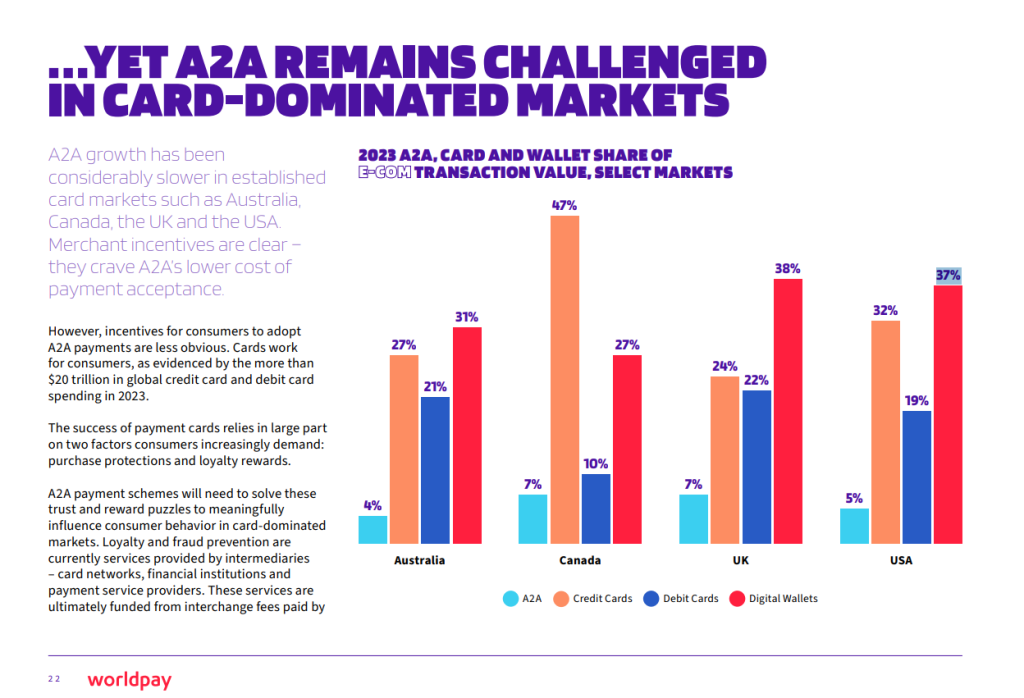
In-store, digital wallet usage is climbing too. About 28% of shoppers used mobile wallets at physical stores in 2024, up from just 19% in 2019.
That said, cards still dominate overall spending. Credit and debit cards account for 35% and 30% of all US consumer payments, while cash sits at around 14%.
Shopify Payments Methods In The United Kingdom and Europe
In the UK, cards remain the top choice for online purchases. Credit cards make up about 62% of payments, and 93% of card transactions under £100 are now contactless.
Digital wallets are growing fast here, too. In 2023, over 29% of UK card transactions came through digital wallets like Apple Pay and Google Pay.
Shopify Payments Methods In The Asia-Pacific
Mobile wallets are taking over across the Asia-Pacific. By 2027, they’re expected to handle 66% of all in-store transactions – up from around 50% in 2023. For merchants selling into this region, supporting local wallets like Alipay, WeChat Pay, or GrabPay can make a real difference in conversions.
Industry restrictions
Even if you’re in a supported country, your business type matters. Shopify Payments has an acceptable use policy that prohibits certain product categories. Industries like adult content, gambling, firearms, and some supplement types may not qualify. Before activating Shopify Payments, review the policy carefully to confirm your products are allowed. Getting your account suspended later creates serious headaches for your business.
Some customers prefer alternatives
Not everyone feels comfortable entering their credit card details directly on a website they’ve never purchased from before. Security-conscious shoppers often prefer using PayPal, Amazon Pay, or digital wallets where their financial information stays with a company they already trust. If you only offer Shopify Payments without alternatives, you risk losing these cautious customers at checkout.
Platform lock-in
Shopify Payments only works on Shopify. If you ever decide to migrate your store to another platform like WooCommerce or BigCommerce, you can’t take Shopify Payments with you. You’d need to set up an entirely new payment processor. This isn’t a dealbreaker for most merchants, but it’s worth considering if you’re not fully committed to Shopify long-term.
How to Choose the Right Payment Methods for Your Store
With so many Shopify payment methods available, picking the right ones can feel overwhelming. The good news? You don’t have to choose just one. Most successful stores offer multiple options. Here’s how to decide which ones make sense for your business.
Consider your customers’ location
Where your customers live shapes how they prefer to pay. Shoppers in China expect Alipay or WeChat Pay. Europeans often use bank transfers. In Latin America, cash-based vouchers are common. Match your payment options to your markets.
Check your payment history
Look at your Shopify orders to see which methods customers actually use. If only a few options drive most of your sales, consider dropping the rest to simplify checkout and reduce fees. But keep methods that bring in high-value orders-even if they’re used less often.
Know your customer demographics
Different generations pay differently:
- Gen Z prefers mobile wallets and BNPL over credit cards
- Millennials lean toward digital wallets and expect fast, convenient checkout
- Gen X still uses cards but is warming up to wallets for bigger purchases
- Boomers prioritize security and favor debit cards for everyday spending
Ask your customers directly
Not sure what your customers want? Survey them. Add a quick question to your post-purchase email or signup form. You can even offer loyalty rewards for completing a brief survey.
Compare processing fees
Fees vary by payment method. Cards typically run 1%–3.5%, while BNPL can cost 2%–8%. If your margins are tight, prioritize lower-fee options and reserve expensive methods for customers who specifically want them.
Think about recurring billing
Selling subscriptions or memberships? Autopay reduces friction for repeat purchases and improves retention. It takes extra setup, but the long-term benefits are worth it.
Prioritize security and compliance
Customers expect their data to be protected. Choose payment providers that offer PCI DSS compliance, fraud prevention tools, and support for regional regulations like GDPR or PSD2. Strong security builds trust-and protects your business from costly breaches.
Plan for international growth
If you’re selling globally, plan to localize your checkout. Support region-specific payment methods, currencies, and languages. On Shopify, you can combine Shopify Payments with third-party integrations to create a familiar checkout experience for customers anywhere in the world. While choosing the right payment gateway is vital for sales, growing enterprises also need to manage their internal outflows. Often, this involves partnering with the best travel management companies to ensure corporate card spending on business trips is integrated directly into their expense tracking systems.
Sync Your PayPal And Stripe Tracking Info Automatically with Synctrack
Using PayPal and Stripe as payment gateways is extremely common on Shopify, together they power a large portion of online transactions globally, especially for small and mid‑size stores.
Because these gateways carry most of your volume, any payout hold hurts cash flow:
- PayPal and Stripe both may delay releasing funds when they can’t automatically verify that an order was shipped and delivered (risk checks, disputes, new accounts, or high‑risk verticals).
- A key signal they rely on is order tracking data (carrier, tracking number, delivery status). If this isn’t pushed into their systems, the algorithm often keeps money “on hold” for days or weeks until enough confirmations or time have passed.
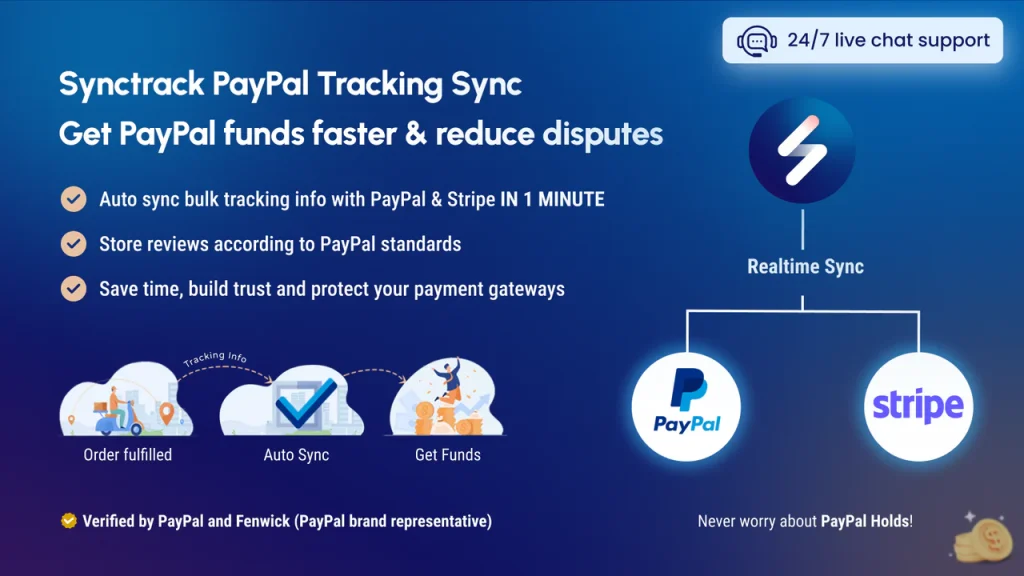
Synctrack PayPal Tracking Sync fixes this by automatically sending your order tracking details to PayPal and Stripe. No manual updates, no copy-pasting tracking numbers. Once an order ships from your store, Synctrack handles the rest.
How Synctrack helps your store:
- Faster access to your money. PayPal releases funds in 1-3 days when they see verified tracking and delivery confirmation. Without it, you might wait 21 days or longer. That’s a big deal when you need cash flow to restock inventory or run ads.
- Fewer “item not received” disputes. Customers sometimes open disputes claiming their package never arrived-even when it did. With tracking already synced to PayPal, the delivery proof is right there. Disputes get resolved faster, or don’t happen at all.
- Keep your PayPal account in good standing. PayPal watches for red flags like missing tracking data or high dispute rates. Too many issues and they’ll limit your account or hold reserves. Regular tracking sync shows you’re running a legit business.
- Pulls tracking from all your sales channels. Selling on Facebook or Instagram? Synctrack grabs tracking info from those orders too, and sends it to PayPal automatically. Everything stays in sync without extra work.
- One dashboard for multiple stores. Running more than one Shopify store? Manage all your PayPal tracking sync from a single place with one subscription. No switching between apps.
- Works with digital products and store pickup. Not every order gets shipped by courier. Synctrack also handles digital downloads and local pickup orders, so you can still sync that info to PayPal and protect your account.
For any Shopify merchant using PayPal or Stripe, Synctrack removes one of the biggest headaches of payment processing, manually managing tracking data, while protecting your account and speeding up your cash flow.
Shopify Payment Methods Key Takeaways
Fees add up quickly, so understanding the full picture helps you make smarter decisions.
- With Shopify Payments, you pay only the card processing rate-no extra Shopify surcharge. On the Basic plan, that’s 2.9% + $0.30 per online transaction. The Shopify plan drops it to 2.6% + $0.30, and the Advanced plan gets you 2.5% + $0.30.
- Third-party gateways are where costs compound. You pay the gateway’s fee (usually around 2.9% + $0.30) plus Shopify’s additional transaction fee (0.5% to 2% depending on your plan). That can add up to 5% or more per sale.
- PayPal runs higher, around 3.49% + $0.49 for US transactions. International PayPal sales add another 1.5%. BNPL services charge even more, typically 3% to 6% per transaction.
Here’s a practical example. On a $200 order using Shopify Payments on the Basic plan, you pay about $6.10 in fees. The same order through PayPal as a third-party gateway costs roughly $10.98 (PayPal’s fee plus Shopify’s 2% surcharge). That $4.88 difference adds up fast when you’re processing hundreds of orders monthly.
The takeaway: Use Shopify Payments for your primary card processing whenever possible. Reserve higher-fee methods like PayPal and BNPL for customers who specifically want them.
Final Thoughts
Choosing the right Shopify payment methods doesn’t have to be complicated. Start with Shopify Payments as your foundation, add PayPal for those who prefer it, and enable digital wallets for mobile shoppers. From there, adjust based on what your customers actually use.
Your payment setup is never truly “done.” New options emerge, customer preferences shift, and what works today might need tweaking tomorrow. Stay curious, keep optimizing, and remember: every improvement you make at checkout puts more money in your pocket.