Enjoy 3 months of Shopify for $1/month ✨

Introducing Synctrack Order Tracking’s New Analytics Dashboard

26 April, 2026

As an ecommerce merchant, you know that the customer experience doesn’t end at the checkout button. In fact, that’s just where the real anxiety begins. “Where is my order?” (WISMO) is the bane of every Shopify store’s customer support team.

But here’s the kicker: to fix delivery delays, you first need to know exactly where the bottleneck is. Is your warehouse team packing too slowly? Are carriers lagging on pickups? Or is the transit time itself the culprit?

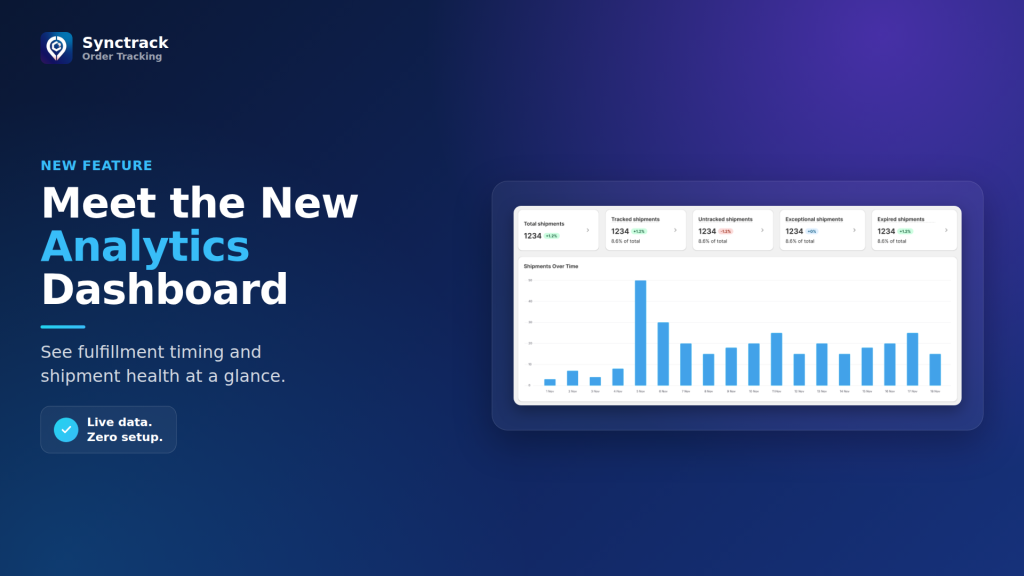
Today, we are thrilled to launch the Analytics Dashboard of Synctrack Order Tracking. This isn’t just a basic tracker; it’s your command center for fulfillment optimization.
synctrack-analytics-dashboard-thumbnail

What’s New? Let’s Break Down the Dashboard

The new Analytics Dashboard is split into two powerhouse tabs designed to give you total visibility over your supply chain, alongside a brand-new AI companion.

🤖 Meet the Trakow Assistant (AI Insights)

No time to crunch numbers? No problem. The Trakow Assistant delivers a quick, data-driven summary of your shipment and fulfillment performance. It automatically highlights trends, flags bottlenecks, and serves up actionable suggestions so you can optimize your workflow in seconds.

Bonus: Even more AI-powered insights are coming soon to guide your next strategic actions!
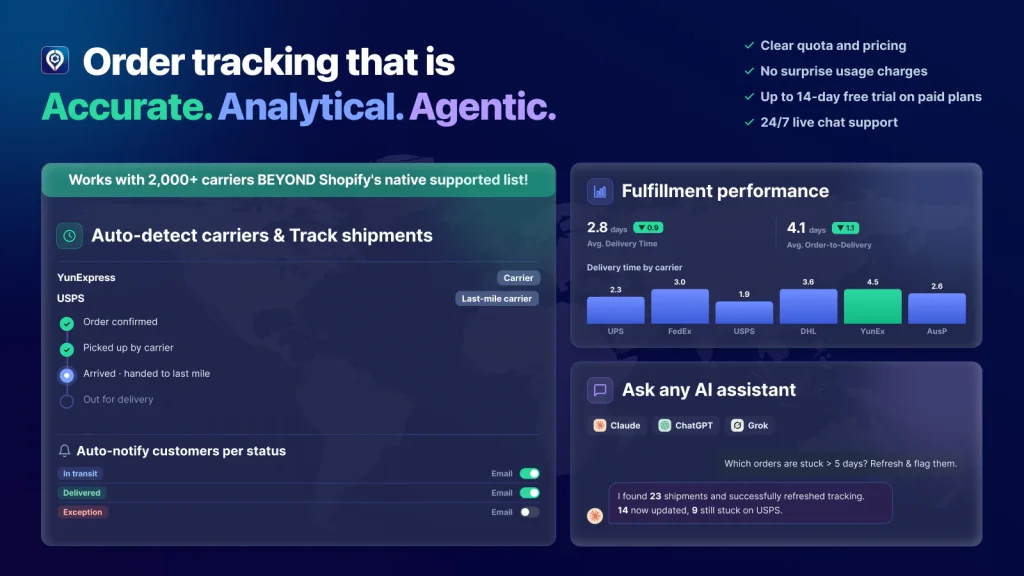
What the Synctrack AI Assistant Does

1. Shipments Overview: Spot Issues Early

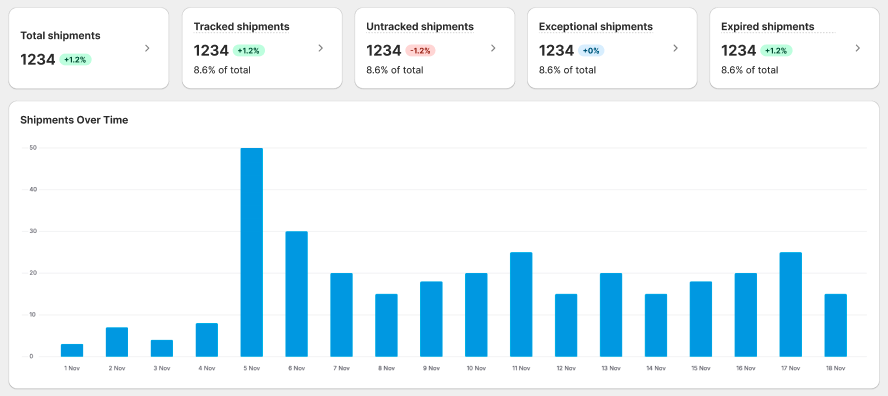
Shipment Overview - Synctrack Order Tracking

Think of this as your daily pulse check. Instead of reacting to angry customer emails, you can proactively monitor your shipping health.

  • Tracked vs. Untracked: If untracked shipments are high, it’s a red flag to check your warehouse workflows or tracking-sync settings.
  • Exceptional & Expired Shipments: Instantly spot packages stuck in transit or experiencing carrier failures before the customer notices.
  • Carrier & Destination Mapping: See exactly which carriers are handling the bulk of your load and which routes are performing best.

Shipments Overview tab is officially available to every single merchant on all plans, including our Free tier.
2. Fulfillment Performance: Map the Full Customer Journey

Fulfillment Performance - Synctrack Order Tracking

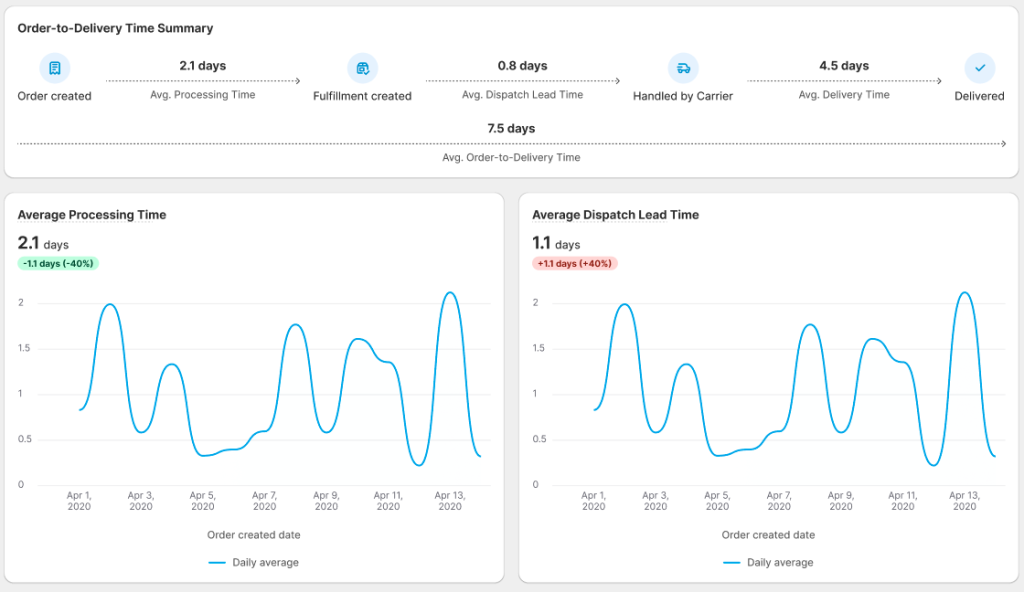
This tab breaks down the Order-to-Delivery Time into granular stages, letting you pinpoint the exact friction points.

  • Processing Time: Measures how fast your team or 3PL picks and packs. (High numbers? You might need more staff during peak days).
  • Dispatch Lead Time (with P90 Benchmarking): Measures the gap between packing and carrier pickup. If your average time is higher than the P90 benchmark, your carrier might be picking up late.
  • Delivery Time & Destination Breakdown: Drill down into specific countries – and even city-level data – to see where last-mile delivery is slowing down.
  • Order-to-Delivery Time: View the full checkout-to-doorstep timeline to gauge the entire customer experience. If this metric shifts upward, you can instantly check the stage breakdown chart to spot whether the slowdown happened in warehouse processing, dispatch handoff, or carrier transit.
  • Average Delivery Time by Destination Location: Look at this brand-new chart to see your delivery metrics ranked from slowest to fastest by country. Click any destination country to open up a city-level breakdown, allowing you to isolate localized last-mile delays, adjust regional EDD promises, or switch carriers for underperforming markets.

Automatic Filtering for Digital & Non-Physical Products

We have a major quality-of-life update for your day-to-day operations. If your store sells digital downloads, gift cards, services, or shipping protection (like Route or Navidium) alongside physical products, your Shipment Dashboard just got a lot cleaner.

  • The Problem: Previously, non-physical items could trigger “phantom shipments” – orders flagged as unfulfilled or missing tracking numbers, skewing your operational data.

  • The Solution: Synctrack Order Tracking now automatically excludes orders containing only non-physical products from your tracking dashboard.

  • What about mixed orders? If a customer buys a physical product and a digital download together, Synctrack is smart enough to keep syncing and tracking the physical portion as normal.

Cheat Sheet: How to Turn Data into Dollars 💰

Data is only useful if you can act on it. Here is a quick guide on how to use your new dashboard to solve everyday ecommerce headaches:


If you notice this problem Check these metrics… Recommended Action 🚀
High volume of WISMO tickets Untracked / Expired Shipments Enable auto tracking sync; review problematic carriers.
Packages sitting in the warehouse Avg. Dispatch Lead Time Schedule earlier carrier pickups; adjust 3PL SLAs.
Fulfillment feels sluggish Avg. Processing Time Optimize packing workflows; adjust daily order cut-off times.
Deliveries are missing deadlines Delivery Time by Carrier Switch carriers for underperforming routes; adjust the Estimated Delivery Date (EDD) promise on your tracking page.

Read our full guide to understand each section and maximize the value of your data.

Optimize Your Speed, Protect Your Margin

The difference between a one-time buyer and a loyal advocate comes down to delivery reliability. With the new Synctrack Analytics Dashboard, you stop guessing and start optimizing.

The Shipments Overview is waiting for you right now on your current plan. And if you’re ready to unlock the full power of AI insights and stage-by-stage fulfillment tracking, upgrade to the Launch plan today!

Aylin AUTHOR

Product Manager at Synctrack Order Tracking - Towards sustainable digital solutions empowering cross-border commerce 🌱