Volume-based promotions like “Buy 2, Save 15%” are proven drivers of average order value (AOV) on Shopify. However, when a customer purchases multiple items to qualify for a discount and subsequently returns only a portion of the order, standard return workflows create an expensive blind spot: over-refunding.
Without dynamic recalculation, return systems refund the discounted rate of the returned unit while allowing the shopper to retain the remaining items at promotional pricing. The merchant loses on both ends – paying out the refund while surrendering the discount condition on the kept merchandise. Synctrack Returns & Exchanges‘ new Item discount distribution for returns setting closes this margin leak automatically.
Managing partial returns on promotional orders no longer requires manual clawbacks or post-return spreadsheet reconciliations. This advanced policy rule dynamically adjusts refund amounts directly within the customer-facing return portal based on what the shopper actually keeps.
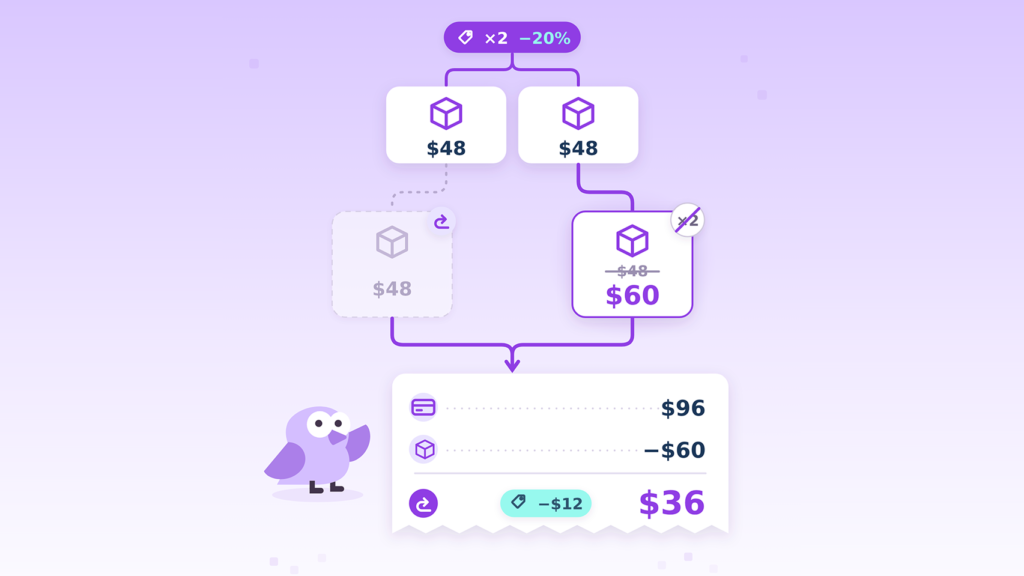
An Advanced policy rule that recalculates the price of retained merchandise whenever a partial return breaks an item-level promotion. Rather than simply issuing the discounted value of the returned unit, Synctrack reprices the items the shopper keeps at full value (or the rate they should now pay) and refunds only the remaining balance.
A shopper buys 2 shirts ($52.70 regular → $44.80 discounted each). Total paid: $89.60.
They later return 1 shirt, breaking the “Buy 2” discount requirement.
Refunds the promotional price. The customer keeps the second shirt at the discounted rate even though the condition broke.
Kept item repriced to full value ($52.70).
$89.60 paid − $52.70 kept = $36.90 refund
(Shopper sees −$7.90 adjustment line).
Supported: Shopify “Amount off products” discounts that require a minimum quantity condition (e.g., “Buy 2 or more, save 15%”).
Not Supported / Excluded: Buy X Get Y (BOGO) deals (merchants should use Synctrack’s Require Return All Items from BOGO/Bundle Deals setting instead); promotions without minimum-quantity conditions; order-level discounts (which remain applied to kept items and are never clawed back); exchange and cancellation requests; and third-party discounts not registered as native Shopify discounts.
(Note: If a promotion is deleted in Shopify after the order was placed, standard refund calculations apply.)
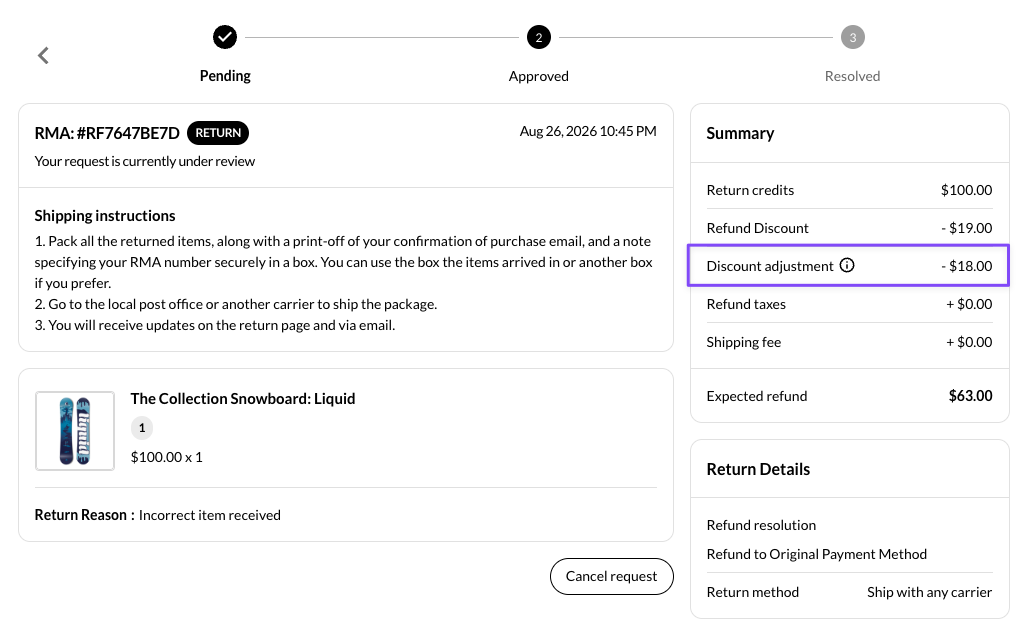
Transparent Portal Experience & Administrative Alignment: During the return portal review step, shoppers see an explicit Discount adjustment row (e.g., −$7.90) directly above their expected refund, complete with an explanatory tooltip. The exact adjustment figure is reflected synchronously in the customer’s request history and inside your merchant Return Management dashboard. Store owners can customize both the line-item label and tooltip text within return page translation settings.
Promotions are structured to exchange margin for volume, not to provide discounted single items through return loopholes. Enforcing your original sales terms during the return phase is essential for maintaining healthy unit economics.
Automated Margin Protection on Kept Merchandise: When discount criteria are broken, unearned savings are automatically recaptured. Recalculating the order protects merchant revenue on kept merchandise without forcing team members to audit every promotional order manually.
Reduced Support Discrepancies and Transparent Processing: Manual adjustments and unexpected deductions often lead to customer confusion and support tickets. By presenting clear, synchronized line items and customizable tooltips in the return portal, shoppers understand why adjustments occur, keeping customer service operations friction-free.
This feature is available exclusively on Synctrack Premium and Enterprise plans (stores on lower plans will see a locked checkbox with an upgrade prompt; if you downgrade in the future, your setting is preserved but will remain paused until you upgrade).
To turn on discount protection in your admin:
In your Synctrack admin, navigate to Settings > Policies.
Scroll down to the Advanced policy card.
Check the box for Item discount distribution for returns.
Click Save.
Note: The rule is off by default and applies immediately to return requests created after saving. Any return requests already in progress will retain their originally quoted amounts.
Ready to protect your promotional margins and automate partial return calculations? Configure the rule in your Synctrack dashboard today, or visit the Shopify App Store to install Synctrack Returns & Exchanges.






