Selling digital products on Shopify keeps growing for merchants all over the world. Ebooks, templates, online courses, software, photo presets, design files – you name it. Many of these sellers take payments through PayPal, but selling digital goods isn’t like selling physical products. It comes with its own set of rules, risks, and traps. If you don’t understand them, you can lose money fast, or worse, get your PayPal account locked.
This guide walks you through how to sell digital products on Shopify in a safe way, covering the most important things every merchant should know about PayPal. We’ll get into seller protection, chargeback risk, how to sync tracking, the fees you’ll pay, and simple strategies to avoid disputes. Let’s get into it.
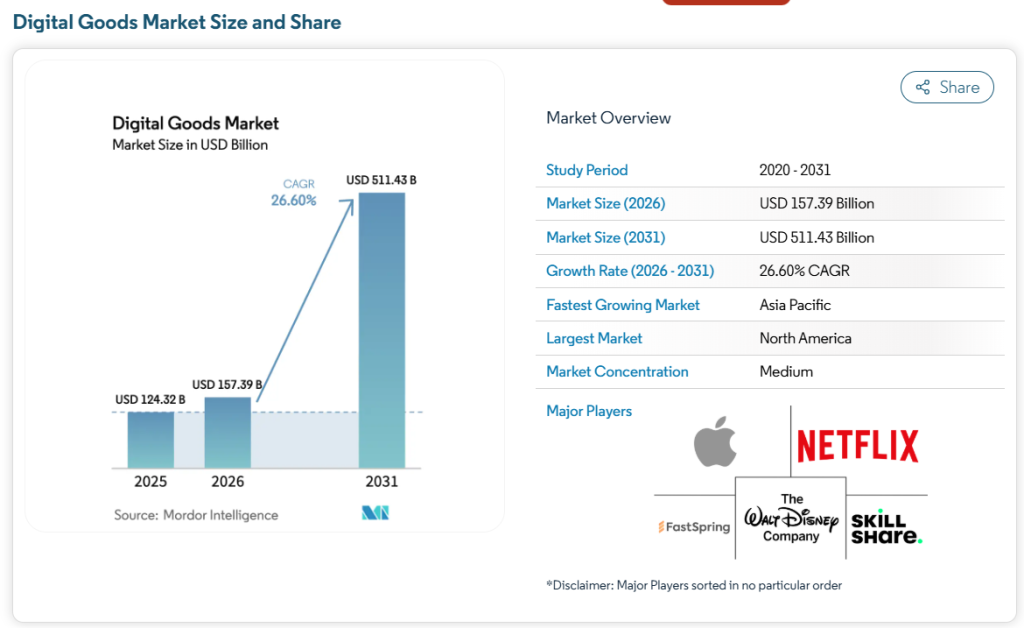
Selling digital products has never been bigger. The global digital goods market was valued at $124.32 billion in 2025, is expected to grow to $157.39 billion in 2026, and projections put it near $511 billion by 2031 – a compound annual growth rate of about 26.6%.
 The momentum shows up everywhere you look. Spending on digital media alone – video, eBooks, music, and games – topped $560 billion in 2024, averaging about $189 per internet user annually on digital content. And the number of digital product transactions jumped around 70% between 2022 and 2024. Online learning is on the same path, expected to climb from roughly $353 billion in 2025 to about $1.49 trillion by 2033.
In short, more sellers than ever are offering courses, software, memberships, downloads, gift cards, and services. But here’s the catch: as this group grows, so does one frustrating problem that comes with it – “PayPal is holding my money, and I don’t even have a tracking number to give them.”
That single issue is now hitting a fast-growing wave of digital sellers. And it starts with a quirk in how PayPal reads your orders.
A digital product is anything you make, sell, and deliver online, with nothing physical to ship. If you’re wondering what fits, here are the categories merchants profit from most:
If you can package your knowledge or creativity into a file, you can sell it.
That covers the full guide. But getting started is simpler than it looks. Here’s the quick version: five steps and you’re ready to sell.
Sign up for a free trial at Shopify.com and pick the Basic plan – it covers everything a beginner needs, and paying yearly saves up to 25%. Choose a clean, fast theme too, since load speed affects both your Google ranking and your sales.

Go to Products → Add Product and fill in:
This is the step most beginners miss:
Shopify won’t host and send files on its own, so you’ll need one – from the free Shopify Digital Downloads for beginners to Easy Digital Products, SendOwl, or FetchApp for bigger needs. Attach your file, then turn on automatic fulfillment so the download link goes out the moment payment clears.
Create one under Settings → Policies and show it on your product pages, at checkout, and in confirmation emails. A simple “All sales are final for digital downloads” line, paired with genuine support for technical issues, cuts disputes way down.
That’s the whole setup. Once these five pieces are in place, your store is ready to go.
👉 Learn More: How To Create Shopify Return Policy (+ Free Generate Tools)
A live store is only the start. These habits help you turn visitors into buyers.
Price by value, not by effort. Because production costs are low, sellers tend to price too low. A template that helps someone land a $60,000 job is worth far more than $5. Charge for the result you deliver.
Show the product in action. Digital files feel abstract, so use mockups – a laptop screen, a phone display, a printed preview – to make them tangible. Add star ratings and a short FAQ right on the product page.
Bundle and tier your offers. Sell a basic version, a full bundle, and a premium tier with extras. Tiers raise your average order value without any new product work.
Build an email list from day one. Offer a free sample – a chapter, a mini-template – in exchange for an email. Then use automated flows to deliver products, onboard buyers, and recommend upgrades.
Use content and short video to pull traffic. A blog targeting long-tail keywords brings free, compounding visits, while TikTok and Reels showing your product being used convert better than polished ads.
When you sell physical goods, you sync a tracking number to PayPal/ Stripe to prove the order arrived and release your funds. But digital products have nothing to ship – so how does that work?
Here’s the strange part: a buyer can open an “Item Not Received” dispute even when there was never a package to send. No carrier, no tracking number, and yet PayPal can still side with them and hold your money.
Why? Most sync apps push a shipping tracking number from Shopify to PayPal to mark an order fulfilled. Digital orders have no code to send, so they get left behind with a “No Tracking” status. To PayPal, that can look unfulfilled – which leads straight to holds and a weaker position in disputes.
So if you sell ebooks, courses, licenses, or PDFs, a regular sync app quietly leaves a chunk of your orders exposed.
This is exactly the gap that Digital Product Sync, a feature inside the Synctrack PayPal Tracking Sync app, is built to close – and it’s worth being clear about how it works.
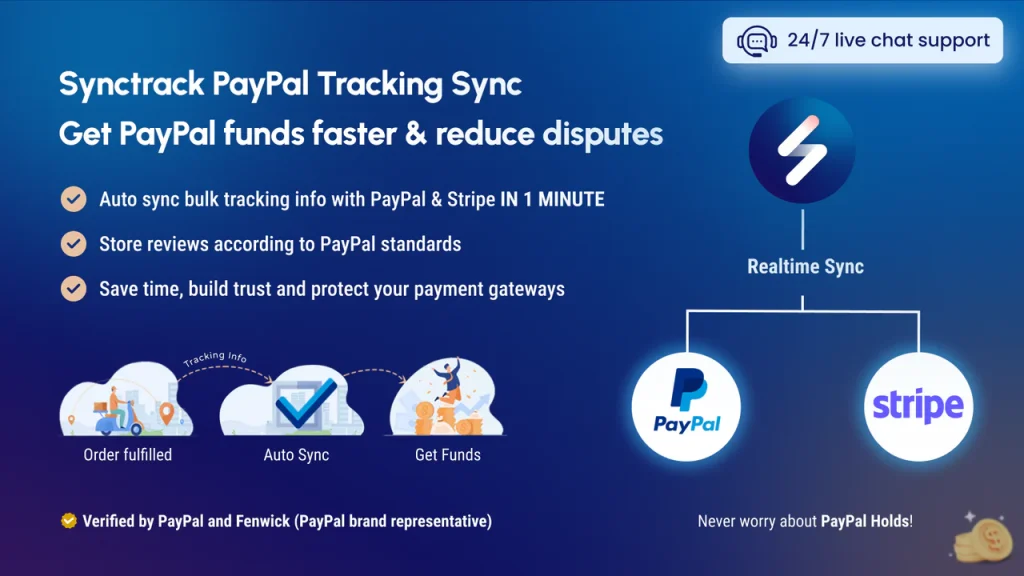
When you turn on Digital Product Sync in Synctrack, the app looks for orders that don’t require shipping (digital goods, services, in-store pickup). Instead of inventing a fake tracking number, Digital Product Sync sends those orders to PayPal, marked as processed and completed. In other words, it gives PayPal a real fulfillment signal – not a made-up courier code.
That distinction matters. You’re not tricking PayPal into thinking a package shipped. You’re telling PayPal the truth: this order is done, and the customer got what they paid for. It’s an honest signal that fills the gap a normal sync leaves open.
A few useful details about how Synctrack handles this:
Done consistently, using Digital Product Sync to mark your digital orders as fulfilled helps you in a few practical ways:
Here’s what most tools won’t tell you: marking an order fulfilled isn’t the same as proving delivery in a dispute. If a buyer files a “Significantly Not as Described” claim, PayPal wants proof they actually received and opened the product – and a fulfillment signal alone won’t win that.
Synctrack can’t do that part for you, and there’s a good reason. Shopify’s API doesn’t share download logs, and the proof PayPal asks for – email confirmations, access timestamps, IP logs – holds sensitive customer data that Synctrack never stores. So keeping that proof is your job. It’s not a gap in the app; it’s the line between what automation should handle and what only you can safely keep.
To stay protected, pair Synctrack with a few easy habits:
Activating Digital Product Sync in Synctrack takes just a few steps:
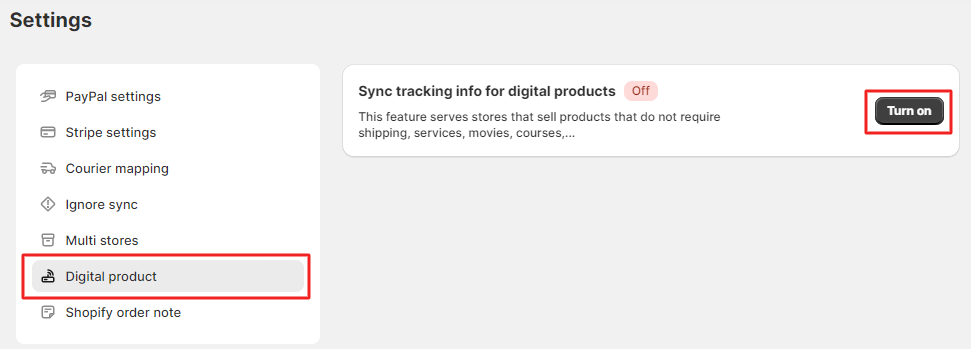


That’s it. From there, Synctrack marks your digital and pickup orders as fulfilled on PayPal automatically – closing the gap that leaves so many digital sellers exposed.
PayPal has a strict Acceptable Use Policy, and many merchants get their accounts locked for selling banned content without even realizing it. These digital products are completely off-limits:
Some categories aren’t banned, but PayPal flags them as high-risk, which can mean higher reserves and possible account limits. These include hosting and web services, subscription software, online training and coaching (high dispute rates because of subjective expectations), and travel-related digital products like electronic tickets.
If your business falls into one of these categories, reach out to PayPal yourself to confirm your category and the terms that apply – rather than getting hit with a sudden account limit.
>>> Learn more: PayPal Account Is Limited: What It Means and How to Fix It
Partly – and the details matter a lot for your bottom line. For years, PayPal Seller Protection only covered physical goods you could ship with a tracking number, leaving digital sellers almost unprotected. PayPal extended Buyer Protection to digital goods in 2015, but it wasn’t until September 2020 that Seller Protection finally covered intangible goods, including digital products – and even then, with a long list of conditions.
A digital product transaction is only protected if it meets both of these conditions at the same time:
For intangible goods, proof of delivery means electronic evidence: a log showing when the file was sent to the buyer’s email or IP address, or confirmation that they accessed or downloaded it.
Selling digital products on Shopify can scale fast – but PayPal holds and disputes will slow you down if you ignore them. Build your defense now: clear terms, honest descriptions, saved delivery proof, and synced fulfillment on every digital order. Turn on Synctrack’s Digital Product Sync to close the tracking gap PayPal flags, and keep Stripe as a backup, so one frozen account never stops your sales. Do this early, and your store grows on a foundation PayPal trusts.
Read More: PayPal Digital Products: Rules, Risks, and 7 Key Things to Watch For