Returns are one of the most annoying parts of running an online store. A customer gets the wrong size, changes their mind, or just doesn’t like the product – and now you have to process a refund, print a label, and hope they come back. Two apps that Shopify merchants turn to for this job are Synctrack Returns vs Loop Returns. Both promise to take the pain out of returns, but they go about it in different ways. This guide breaks down how the two apps compare on features, pricing, and the process of switching from one to the other, so you can make that call with confidence.
| Feature | Synctrack Returns | Loop Returns |
| Built for Shopify Badge | ✅ | ❌ |
| Platform focus | Shopify-native & Shopline-supportive | Many platforms |
| Product focus | Best-in-class returns & exchanges | Many products (Returns, Order editing) |
| Custom enterprise pricing | ✅ | ✅ |
| Annual contract required | Flexible | ❌ Required |
| Dedicated technical support | WhatsApp, Trello, Slack (Enterprise) | Slack only (Enterprise) |
| Live chat support 24/7 | ✅ | ❌ only during business days, 5 days a week |
Both apps plug into your Shopify store and give customers a self-service portal where they can start a return or exchange without emailing your support team. From there, the two apps start to look different.
Loop Return puts most of its energy into turning returns into new sales. Its portal nudges shoppers toward an exchange rather than a refund, and it uses AI trained on more than 200 million shopper events to predict which returns are likely fraud and which policies work best for your store.
Synctrack Returns & Exchanges puts its energy into flexibility and reach. It gives merchants unlimited return rules, connects to thousands of carriers worldwide, and offers a multilingual portal so international shoppers can use it in their own language. It also builds in the paperwork EU stores will need for returns starting in mid-2026.
Both apps let customers start a return on their own, without help from a support agent. Loop’s version is built around getting shoppers to swap their item instead of asking for money back. Features like Shop Now (which gives shoppers store credit before they even send the item back), Bonus Credit, and Instant Exchanges are all designed to keep that sale in-house. Loop also lets shoppers edit an order after it’s placed, which can stop a cancellation before it happens.
| Exchange Feature | Synctrack Returns | Loop Returns |
| Same item/variant exchange | ✅ | ✅ |
| Exchange for a different product | ✅ | ✅ |
| Pre-order exchanges | ✅ | ✅ |
| Bonus/incentive credit for exchange | ✅ | ✅ |
| Retain pop-up / upsell | ✅ | ✅ |
| Reserve stock on exchange | ✅ | ✅ |
| AI Smart Exchange (variant recommendation) | ✅ | ✅ (Loop Intelligence) |
| Refund Feature | Synctrack Returns | Loop Returns |
| Refund to original payment | ✅ | ✅ |
| Store credit | ✅ | ✅ |
| Gift card | ✅ | ✅ |
| Discount code refund | ✅ | ❌ |
| Refund by bank transfer | ✅ | ❌ |
| Partial refund for BOGO/Bundle | ✅ | ❌ |
Synctrack Returns’ workflow covers the basics well – refunds to the original payment method, store credit, gift cards, and discounts – while still pushing exchanges as an option. Once a customer submits a return, Synctrack routes it to the right carrier automatically. Merchants who’ve used it say the setup is simple and it cuts down on manual work.
In short: Loop is built to sell you more, Synctrack is built to process returns faster. If your goal is squeezing extra revenue out of every return, Loop’s approach has the edge. If your priority is getting returns handled quickly and cleanly, Synctrack does that well too.
Loop’s automation runs on AI. It studies past shopper behavior and adjusts return policies on its own, and merchants can still layer in their own rules – things like return windows or who qualifies for an exchange. Its fraud detection also runs automatically in the background, flagging suspicious activity using blocklists and pattern recognition.
Synctrack takes a more manual, rule-based approach, but it doesn’t skimp on options. You can set unlimited return policies, auto-approve returns that look low-risk, add return fees, and build in exchange upsells. It pulls Shopify order data in real time, so approvals and label generation happen without you lifting a finger. With more than 2,000 carriers connected, tracking updates come through automatically too.
| Feature | Synctrack Returns | Loop Returns |
| Return policy/window rules | ✅ | ✅ |
| Condition-based workflows | ✅ | ✅ |
| Auto-approve / auto-label / auto-refund | ✅ | ✅ |
| Fees (return shipping/restocking/handling) | ✅ | ✅ |
Neither app is “more automated” than the other – they just automate different things. Loop automates decisions using AI. Synctrack automates the process using rules you set yourself.
Loop connects deeply with the Shopify ecosystem – orders, products, and point-of-sale – and also works with tools like Klaviyo, Gorgias, Attentive, NetSuite, and major third-party logistics providers. It has a separate order-tracking service and a reputation for having one of the largest integration networks among returns apps, with solid coverage across the US, EU, and Australia/New Zealand.
Synctrack’s strength is on the shipping side. It connects to carriers like FedEx, Shippo, Sendcloud, ShipStation, Easypost, and Australia Post, on top of its 2,000+ carrier network. It also works with Shopify Flow, Shopify’s Customer Accounts, and Gorgias. Enterprise customers get access to multi-store setups and warehouse management system (WMS) integrations.
| Feature | Synctrack Returns | Loop Returns |
| Prepaid label generation | ✅ | ✅ |
| Packing slip | ✅ | ✅ |
| Printerless returns (QR code) | ✅ | ✅ |
| Carrier coverage | 2,000+ couriers | Major carriers |
| Auto-select cheapest/fastest carrier | ✅ | ✅ |
| Multi-warehouse routing | ✅ | ✅ |
| Automatic return shipment tracking | ✅ | ✅ |
| Return tracking page for customer | ✅ | ✅ |
| 2-way Shopify Returns Sync | ✅ Strong | ✅ |
| Gorgias | ✅ | ✅ |
| Shopify Flow | ✅ | ✅ |
| Open API + Webhooks | ✅ | ✅ |
| Return MCP for AI assistant | ✅ | ✅ |
If your business relies heavily on marketing and support tools, Loop’s integration list will likely cover more of what you already use. If shipping logistics and carrier coverage matter more to you, Synctrack has the deeper bench.
Loop’s analytics lean predictive. It can flag orders that are “at risk” of becoming a return before it even happens, and its dashboards use AI to spot trends and suggest policy changes. There’s also a Glew integration for merchants who want custom reporting.
Synctrack’s analytics are more straightforward. You get numbers on return volume, the reasons customers give for returning items, and how well exchanges are recovering revenue. The Premium plan adds more advanced reporting, and the data can help you spot repeat returners – useful for catching abuse even without AI doing the guesswork.
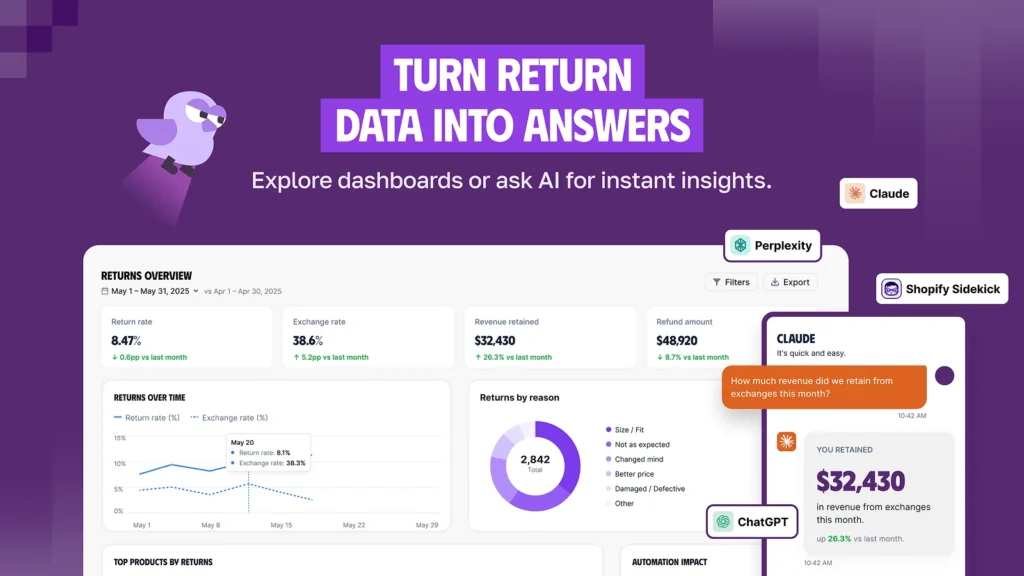
Think of it this way: Loop tries to tell you what’s going to happen. Synctrack tells you clearly what already happened. Both are useful – it depends on whether you want predictions or straight numbers.
| Plan | Loop Returns | Synctrack Returns |
| Free | Checkout+: free, but only covers US/Canada shipping and label printing | Starter: free, up to 5 returns/month, branded portal, basic refunds, 24/7 chat |
| Entry-level | Essential: $155/mo – unlimited return destinations, automated policies, carrier rate shopping | Professional: $19.99/mo – up to 60 returns, exchanges, store credit/gift card refunds, EU Withdrawal forms, return fees |
| Mid-tier | Advanced: $340/mo – adds Shop Now, Instant Exchanges, Bonus Credit, fraud prevention | Premium: $49.99/mo – up to 120 returns, unlimited automation rules, auto tracking, advanced analytics, product/BOGO exchanges |
| Enterprise | Custom pricing, quoted per store | Enterprise: $149.99/mo – up to 300 returns, multi-store support, WMS integration, API/webhooks, dedicated onboarding |
Look at the monthly price alone and Loop seems a lot more expensive than Synctrack – but the two apps charge you in different ways, so a straight price comparison isn’t really fair.
Here’s the key difference to keep in mind before anything else: Loop charges based on features and never caps how many returns you can process. Synctrack charges based on features and a monthly return limit – go over it, and you’ll need to upgrade. This one detail decides which plan actually fits your store, so it’s worth understanding before you look at the numbers below.
If your store is small or just starting out: Loop’s Checkout+ plan is free, but it only handles returns shipped within the US and Canada. Synctrack’s Starter plan is also free, and covers up to 5 returns a month, with a branded returns portal and 24/7 chat support included.
If you need the basics to run things smoothly: Loop’s Essential plan costs $155/month and lets you accept returns from anywhere, with automated policies and carrier rate shopping. Synctrack’s Professional plan is only $19.99/month but caps you at 60 returns – in exchange, you get exchanges, refunds via store credit or gift card, EU Withdrawal forms, and more advanced return rules.
If your store has steady order volume and needs stronger tools: Loop’s Advanced plan ($340/month) adds Shop Now, Instant Exchanges, Bonus Credit, and fraud prevention tools. Synctrack’s Premium plan ($49.99/month, up to 120 returns) gives you unlimited automation rules, automatic tracking, deeper analytics, and support for exchanging into different products or handling BOGO-style returns.
If you’re a larger business with multiple stores: Loop doesn’t publish an Enterprise price – they quote it per store. Synctrack is upfront about it: $149.99/month for up to 300 returns, plus multi-store support, WMS integration, API/webhooks, and dedicated onboarding help.
If your return volume is high and steady, Loop’s flat, unlimited pricing can end up cheaper in the long run. But if your return volume is lower or unpredictable, Synctrack is usually the more affordable choice – as long as you keep an eye on your monthly limit so you don’t get caught needing an upgrade.
| Feature | Synctrack Returns | Loop Returns |
| Custom reasons + sub-reasons | ✅ | ✅ |
| Photo evidence | ✅ | ❌ |
| Video evidence upload | ✅ | ❌ |
Both apps take fraud seriously, but they solve it differently. Loop uses AI trained to catch patterns that suggest abuse, backed up by blocklists and automated workflows.It’s a smart, hands-off system, though it lacks some of the strict physical checks other platforms offer, such as mandatory photo or video evidence of an item’s condition.
Synctrack combines rigorous verification controls with modern AI tools. Every return flows through a secure portal where merchants can enforce photo or video proof, verify carrier shipments, restrict refund options (e.g., offering store credit instead of cash back), and outright block repeat offenders. Enhancing these safeguards, Synctrack also incorporates AI Smart Exchange – which intelligently recommends alternative products to keep revenue in your business – and integrates with AI support agents via MCP tools to automate workflows seamlessly.
If you prefer a purely pattern-based AI running in the background, Loop does that well. But if you want the best of both worlds – smart AI features to retain revenue and streamline returns, paired with total direct control over proof requirements, refund rules, and account blocking – Synctrack gives you a much more complete toolkit.
Both apps are built for stores that sell internationally, just with slightly different strengths. Loop supports multiple languages and currencies and works with regional shipping partners, making it a solid fit for brands with UK or EU customers who need to handle VAT and local refund rules.
Synctrack’s carrier network – over 2,000 carriers spanning the US, UK, EU, and Australia – means it can generate labels almost anywhere your customers are. Its portal is multilingual too, and the built-in EU Withdrawal form support means European compliance is one less thing to worry about.
| Feature | Synctrack Returns | Loop Returns |
| Branded self-serve portal | ✅ | ✅ |
| White-label custom domain | ✅ | ✅ |
| Auto-sync Shopify brand color/logo/policy | ✅ | ❌ Manual |
| Multi-language portal | ✅ | ✅ |
| Embedded return portal in Shopify store | ✅ | ❌ |
| Account-page return widget | ✅ | ❌ |
Both apps look clean and fit naturally into a Shopify storefront, so customers won’t feel like they’ve left your site. Loop’s portal is often praised for being intuitive, and merchants like that setup and support are quick and responsive. Its email templates are also easy to customize.
Synctrack carries Shopify’s “Built for Shopify” badge, and merchants describe the setup as quick with a clean interface. It goes further on customization for merchants who want it – full control over CSS styling, a custom subdomain on higher plans, a built-in email editor, and adjustable fees and portal text.
Both apps let you brand the return experience so it matches the rest of your store, so this comes down to how much control you personally want over the finer details. Synctrack offers more knobs to turn; Loop keeps things simpler out of the box.
Loop promises fast support – under two hours on average – but only during business days, five days a week. Merchants who’ve worked with Loop’s team describe them as genuinely helpful when issues come up.
Synctrack offers live chat support 24 hours a day, seven days a week, even on its cheapest plans. Enterprise customers also get dedicated help getting set up. While Synctrack doesn’t publish a specific uptime number, its Shopify “Built for Shopify” status suggests it meets Shopify’s reliability standards, and the company markets its support as available worldwide around the clock.
If support availability outside business hours matters to you, Synctrack has the clear advantage here.
Loop and Synctrack both do a good job of solving the same basic problem – returns that used to eat up your support team’s time and your bottom line. Loop is built for stores that want to turn returns into a revenue channel, backed by AI and deep integrations, and it’s priced accordingly. Synctrack is built for stores that want a reliable, affordable, and globally-ready returns process, without needing AI to make decisions for them.
There’s no wrong choice here – just the right one for your store’s size, budget, and how much control you want over the process. Start by counting your average monthly returns, then match that number against the pricing tiers above. From there, the better fit usually becomes obvious.






