Every e-commerce merchant knows the sudden spike of adrenaline that comes with a PayPal dispute email. It usually triggers the same chaotic routine: hunting down tracking numbers, digging up refund IDs, copying policy links, and rushing to pull it all together against a strict deadline.
When you are scaling a Shopify store, losing 20 minutes per dispute isn’t just annoying – it directly eats into your profit margins and damages your payment gateway health.
That is why we built PayPal Dispute Management inside Synctrack. We are bringing your entire PayPal dispute workflow directly into your Shopify admin, turning a chaotic scramble into a automated, one-click process.
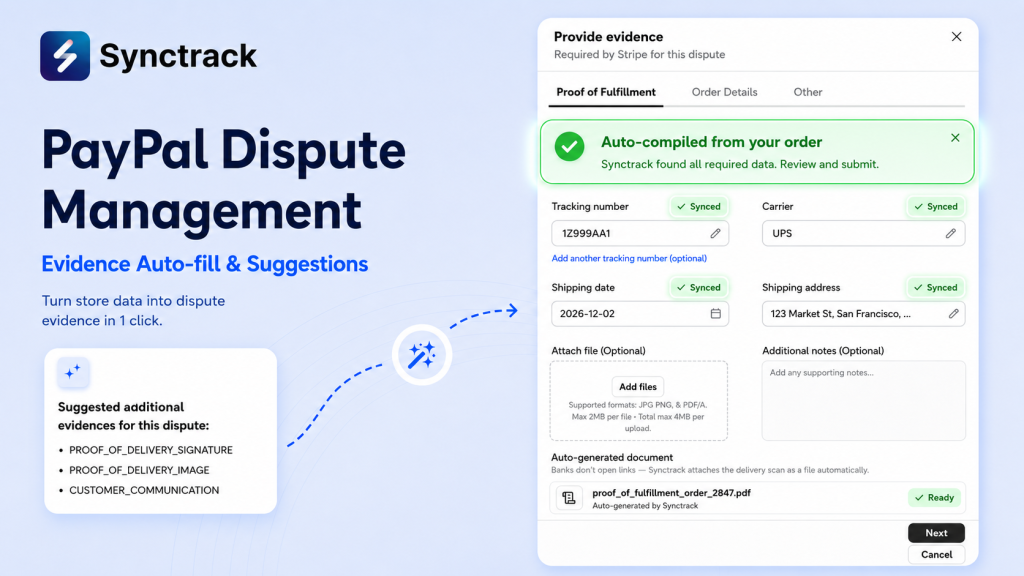
You can now track, manage, fight, and win PayPal disputes without ever logging into the PayPal Resolution Center.
Here is how Synctrack protects your revenue:
We made setup incredibly straightforward so you can secure your store today.
Step 1: Turn on Dispute Management
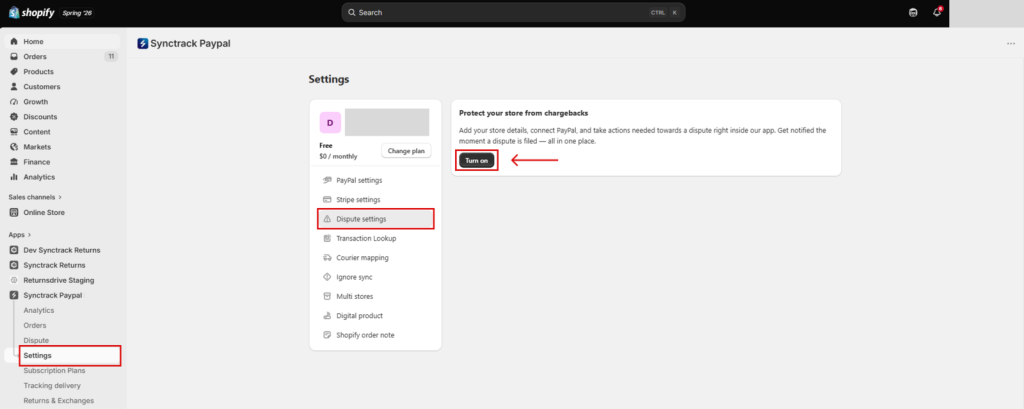
Navigate to Settings > Dispute settings in your Synctrack app and toggle Turn on.
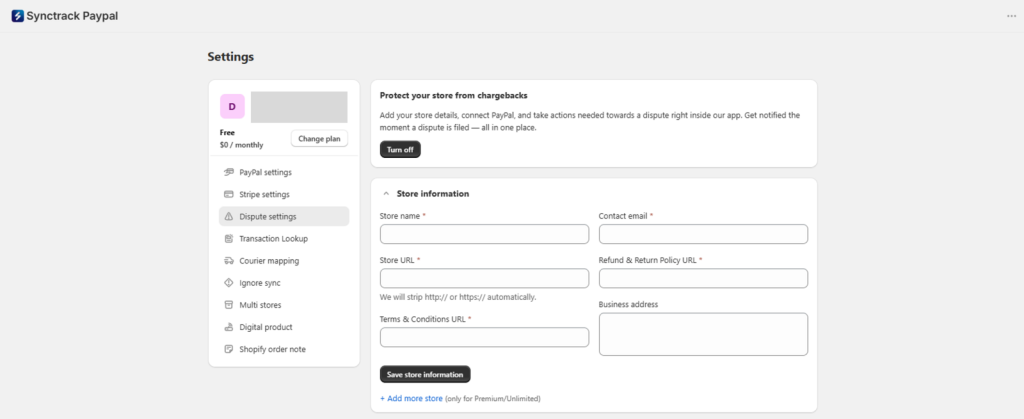
Step 2: Save Your Store Information
Enter your store details and paste your Refund & Return Policy and Terms & Conditions URLs. Synctrack uses this data to auto-compile the “Store Info” evidence tab for future disputes.
💡 Growing brand? If you are on our Premium or Unlimited plans, you can click + Add more store to manage separate dispute configurations for all your connected storefronts.
Step 3: Connect Your Gateway
In the Payment Gateway card, click Connect Paypal Development Account and enter your account email, Client ID, and Secret Key. (Need help finding these? Check out our quick step-by-step connection guide).
Step 4: Configure Alerts
Add up to 5 team members to receive notifications. Toggle the exact events you want to track, from New dispute opened to Response deadline in 48 hours and Monthly dispute reports.
Once you hit save, a green Setup complete! banner will confirm you are fully protected.
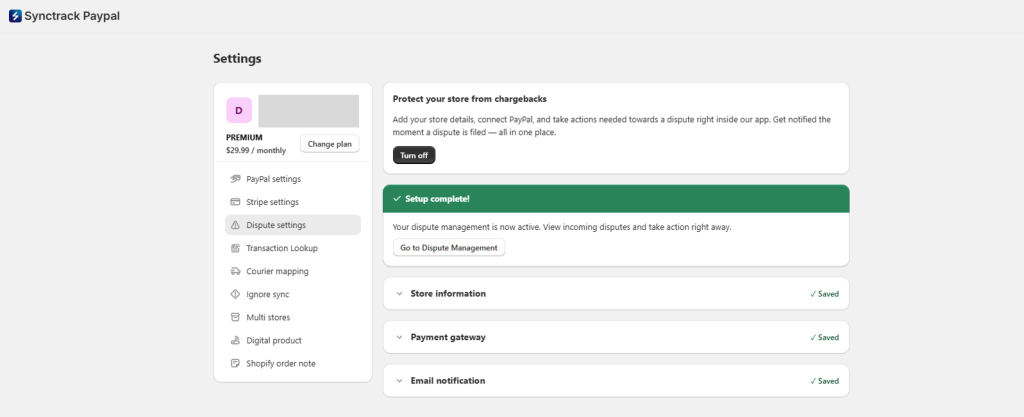
Once active, two powerful spaces clear the chaos out of your dispute management:
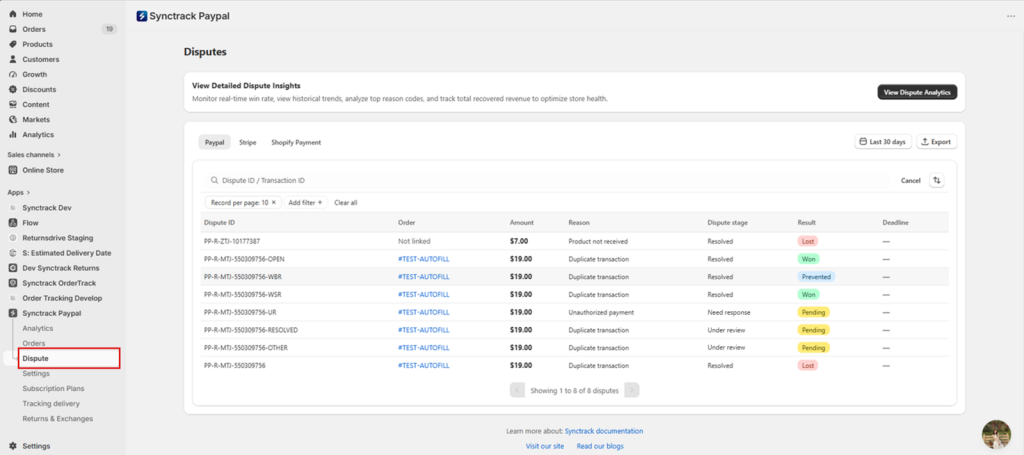
No more jumping between different email accounts or PayPal tabs. The Disputes list gives you a clean view of every open case across all connected accounts. Filter by dispute stage, amount, or reason code, and instantly see color-coded results (Won, Lost, Prevented, or Pending).
Even if a disputed transaction belongs to an order that wasn’t originally synced by Synctrack, it will still surface here so nothing slips through the cracks.
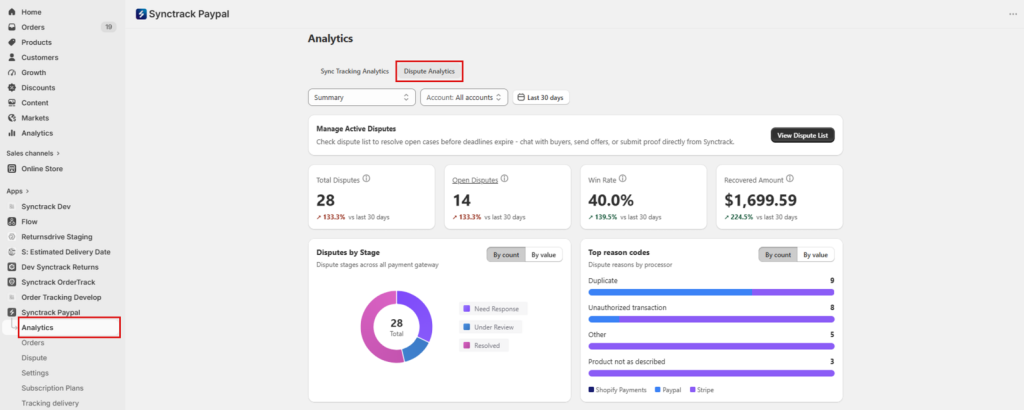
Knowledge is power. The Dispute Analytics tab gives you a high-level view of your business health. Toggle metrics By count or By value to analyze:
Available on All Paid Plans: One-click evidence auto-fill is unlocked for all paid plan subscribers at no extra cost and uses zero sync quota. Free plans can still manage disputes within the dashboard but must input evidence fields manually.
We are expanding Synctrack’s Dispute Management capabilities to deliver a unified chargeback solution. Dispute management for Stripe is now available in Beta, with full support for Shopify Payments coming soon.
Ready to protect your bottom line?
Log into your Shopify admin, open Synctrack, and activate Dispute Management under Settings today.
If you want our team to do a quick setup review to ensure your courier mappings and PayPal developer accounts are perfectly dialed in for your order volume, just reach out to our support team – we are happy to take a look!
|
Turn on Dispute Management in Synctrack When a dispute opens, Synctrack catches it, tells you, and has your evidence ready before the clock becomes a problem. Every new dispute lands in your Disputes List automatically |






