Packages get lost. Boxes show up dented. Porch pirates exist. If you run a Shopify store long enough, you’ll deal with all three. The real question is who pays when it happens. That’s where shipping insurance Shopify options come in. But here’s what most guides skip: it isn’t one product. It’s at least four different things using the same name. Shopify runs some, some by carriers, some by outside companies, and some by you.
This guide covers all of it. You’ll learn what shipping insurance actually is, when it’s worth the money, how to add it to your store, and what to do if you ship expensive stuff like jewelry or electronics.
Contents
Shipping insurance reimburses you if a package is lost, stolen, or damaged in transit to a customer. It covers the value of what’s inside the box, not just the shipping fee you paid.
Most merchants think they already have insurance because their carrier “covers” packages. They don’t. What carriers offer is carrier liability or declared value, and it’s a different animal.
FedEx says it right on their own page: declared value is not shipping insurance. It just sets the most FedEx will pay if the company is found at fault. UPS works the same way. You’re paying for a higher liability limit, not real coverage.
Real shipping insurance pays based on the policy you bought, not just whether the carrier messed up. That gap shows up fast the first time you file a claim and get denied.
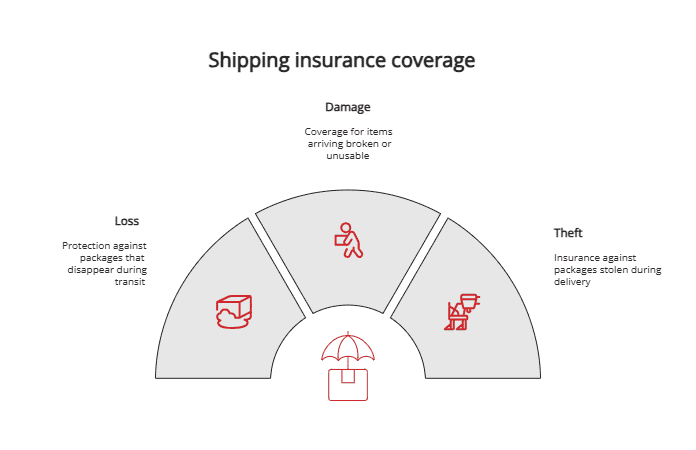
Most policies cover three things:
What’s actually paid out depends on the provider. Shipsurance, which powers Shopify’s built-in insurance, covers loss and damage during transit and theft after delivery. But there are gaps. Wrong addresses won’t be paid out. Customs holds won’t either. And if your customer’s stolen box had a brand name on the outside that gave away what was inside, the claim can be denied.

The process looks roughly the same across providers:
The big difference is who handles the claim. With Route, the company handles it. With self-funded apps, it lands back in your inbox. Carriers like USPS, UPS, and FedEx each have their own claim forms, deadlines, and proof rules.
A smooth claim comes down to four things: tracking, proof of value, photos, and filing on time. The stores that document orders well before anything goes wrong almost always file the cleanest claims.
It depends on what you sell and how often things go wrong.
A quick rule of thumb: if losing one order would hurt more than ensuring 100 orders, ensure it. If not, skip it.
There’s also a customer side to this. A lost package isn’t just a refund. It’s a frustrated buyer, a support ticket, maybe a chargeback, sometimes a one-star review. Even when the math says self-insuring is cheaper, paying for coverage can save hours of support work. That’s why most stores add some kind of protection once they get past a few thousand orders a month.
You’ve got four ways to do this. Each one has its own pros and cons:
| Option | Pros | Cons | Best for |
| Native Shopify Shipping (Shipsurance) | – Up to $200 free coverage on eligible U.S. labels
– Buy coverage when printing the label – File claims directly from the Shopify admin – Extra coverage up to $5,000 available – No extra app to install |
– Only works for U.S.-origin shipments
– Doesn’t work with most 3rd-party label apps – Requires Shopify Payments + Grow, Advanced, or Plus plan – Extra-coverage pricing isn’t public |
U.S.-based stores printing labels inside the Shopify admin that want the simplest setup. |
| Carrier insurance (USPS, UPS, FedEx) | – Use negotiated carrier rates
– High coverage limits available (up to $50,000+) – Live carrier rates at checkout – Works with existing carrier accounts |
– Mostly carrier liability, not real insurance
– Carrier must accept fault to pay out – Different rules/forms for each carrier – Needs Advanced/Plus plan for carrier rates – Strict packaging & proof requirements |
Stores on negotiated carrier accounts that want coverage tied to their existing shipping setup. |
| Insurer-backed apps (Route) | – Outside company handles all claims
– Customer pays the premium, not the merchant – Polished post-purchase experience – Zero monthly cost for the brand – Easy widget setup at checkout |
– Customer files claims with 3rd party, not brand
– Less control over the claim process – Pricing for shoppers can feel unclear – Merchant gives up protection fee revenue |
Brands wanting fully outsourced claims and a smooth checkout add-on without managing the back-end. |
| Self-funded apps (Navidium, Captain) | – Keep 100% of protection fees
– Full control over pricing & claim rules – Branded claim portal stays on store – Free tiers for low-volume stores – Higher long-term margin |
– Merchant carries all risk for lost/damaged orders
– Merchant handles every claim – Must build claim policy and process – Big losses can hit hard before fees pile up |
Stores with low loss rates & decent volume that want max margin and can run their own claim flow. |
| Manual line-item protection | – No app needed, no monthly fee
– Full control over offer and price – Quick to set up – Good for testing customer interest |
– Merchant handles every claim by hand
– No widget, portal, or automation – Easy to violate Shopify disclosure rules – Doesn’t scale well – Looks less polished |
New/low-volume sellers are testing if customers will pay for protection before investing in an app. |
This is the easiest path if you print your labels inside the Shopify admin. Shopify works with Shipsurance to offer insurance right when you buy a label.
Who gets it for free: Stores shipping from the United States, buying labels directly in Shopify, using Shopify Payments, and on the Grow, Advanced, or Plus plan get up to $200 USD of coverage free on eligible labels. The same $200 free coverage applies to Managed Markets orders on those plans.
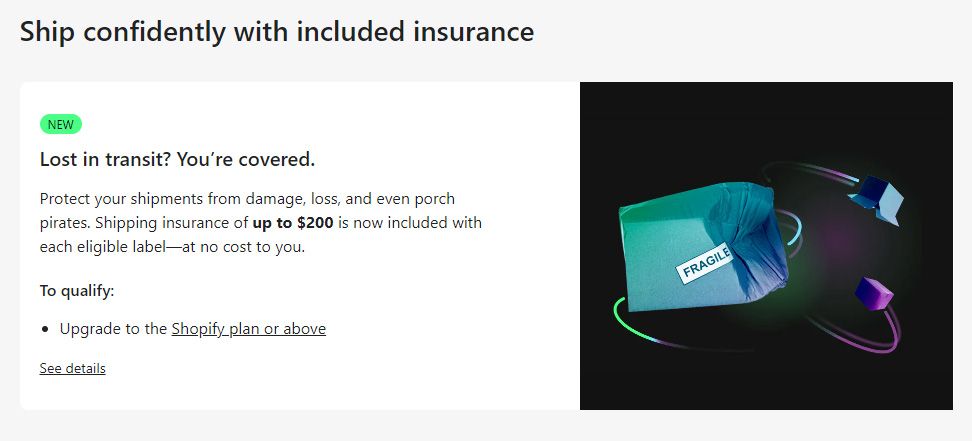
Note: According to official Shopify documentation, this free Shipsurance coverage applies specifically to the Grow, Advanced, and Plus tiers (the Grow plan was previously known as the “Shopify” plan in many regions, so older guides may still reference it by that name).
For orders over $200, you can buy more coverage during the label purchase, up to $5,000 USD when eligible.
To file a claim: Open the order, click the menu on the fulfillment card, and pick File shipping claim. You can submit it right from the Shopify admin. For most shipments, you can file 24 hours after shipping, up to 120 days from the ship date.
If you connect your own carrier account to Shopify, you can buy coverage tied to that carrier when you print a label. Live rates from your account also show up at checkout.
To connect a carrier, go to Settings → Shipping and delivery → Carrier accounts and add UPS, FedEx, USPS, or another supported one. Carrier-calculated shipping comes free on Advanced and Plus plans (Grow stores can add it for an extra fee).
Here’s what the carriers offer for 2026:
Just remember: With all three, you’re paying for a higher liability limit, not full insurance. Your claim only pays out if the carrier accepts fault under their strict packaging and delivery rules.
Several Shopify apps like Blockify Shipping Protection add a checkbox or widget at checkout that lets customers pay for protection on their order. They come in two flavors, and they work differently.
Either way, apps handle the disclosure, the widget, and the claim flow automatically, which is why most growing stores end up using one.
A number of merchants dealing with the loss have started looking at Cabrella as an alternative to relying solely on carrier insurance.
It’s a SaaS platform that integrates with Shopify and shipping tools like ShipStation, so it doesn’t really change how you already fulfill orders. A few things that stand out about it:
Pro tip: If you’re shipping anything high-value through Shopify, stop absorbing the cost of lost packages and carrier headaches. Plugging in Cabrella’s API is one of the smartest moves you can make to protect your cargo, cut premium costs, and put your risk management on autopilot.

Don’t want to install an app? You can do it yourself with a workaround.
Create a product in your store called “Shipping Protection.” Set it as a service item that doesn’t need physical shipping. Then, either add it to draft orders before sending the invoice, or let customers add it to their cart themselves.
It works, but Shopify has strict rules for optional charges:
The catch? You still have to handle every claim yourself. There is no widget, no portal, and no automated emails. When a package goes missing, the customer emails you, and you sort it out by hand. This method only makes sense when you’re just starting out and want to test if customers will actually pay for protection before you invest in a paid app.
Here’s what extra coverage runs through the main carriers, based on their public rates:
| Order Value | UPS Declared Value | FedEx Declared Value | Notes |
| $80 | $0 (under $100 limit) | $0 (under $100 limit) | Basic liability already covers it |
| $250 | $2.70 minimum | $4.95 | Depends on your margin |
| $500 | $3.60 | $8.25 | FedEx adds free signature here |
| $1,500 | $12.60 + signed form | $24.75 | Signature usually required |
| $5,000 | $44.10 | $82.50 (or use a specialist) | Specialist coverage worth it |
Shopify’s native Shipsurance charges $0.89 per $100 of coverage for domestic shipments and $1.29 per $100 for international shipments. The exact total shows up when you buy the label inside the Shopify admin, so you’ll see the final cost before paying.
How fast you get paid depends on who’s handling the claim:
Fast claims have the same things going for them every time: tracking, clear photos, an invoice, and a full claim form filed before the deadline.
Even with the best shipping insurance setup, you’ll still get one question more than any other from your customers: “Where is my order?”
It shows up in your inbox a day after the order ships. Then again on day three. Then again on day five. Each ticket costs you time, drains your support team, and chips away at customer trust. And the worst part? Most of these customers already have a tracking number. They just don’t know what to do with it.
Now scale that up. If 100 orders go out a week and 30% of buyers ping support asking for an update, that’s 30 tickets a week on nothing but tracking. Your team isn’t solving real problems. They’re copy-pasting carrier links. Meanwhile, anxious customers leave bad reviews, file early chargebacks, and stop ordering again. Shipping insurance pays you back when a package is lost. It doesn’t help when a buyer is just nervous about the delivery date.
That’s the gap Synctrack Order Tracking fills. Instead of sending customers off to a carrier site, Synctrack gives them a branded tracking page on your store with real-time updates. Customers see the current order status, the estimated delivery date, and every shipping update in one place.
Here’s what makes it work for Shopify merchants:
Pricing is simple. The Free plan covers up to 20 orders a month and gives you the basic tracking features. The Launch plan ($9/month) adds tracking analytics, SMS notifications, and upsell tools. The Scale and Pro plans are for growing stores that need higher order limits, advanced analytics, and priority support.
If shipping insurance protects you when things go wrong, Synctrack stops most of the tickets from being filed in the first place. Fewer WISMO emails. Happier customers. A support team that finally has time for real problems.
Shipping a $50 hoodie is one thing. Shipping a $3,000 watch is another. Standard carrier liability rarely covers high-value stuff well, and the rules get stricter the more expensive the order is.
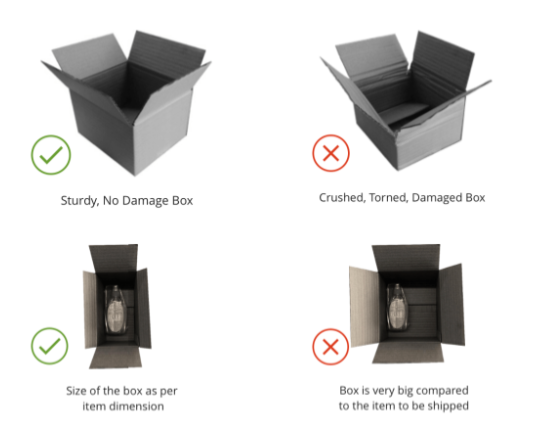
For pricey shipments, carriers and insurers tack on rules. Break them and your claim dies:
Packaging matters just as much. UPS pushes for rigid corrugated boxes with real cushioning. FedEx says double-box fragile items with about 3 inches of padding inside the inner box. USPS keeps it simple: cushion fragile items, prep them carefully.
One thing too many merchants miss: never ship in branded boxes that show what’s inside. Shipsurance can deny a claim if a stolen package was in original manufacturer packaging that gave away the contents. Plain outer box, always.
Standard parcel coverage isn’t built for really valuable items. If you ship watches, fine jewelry, electronics, or art regularly, look at specialist providers instead:
These aren’t typical Shopify app installs. You set them up as business accounts directly with the provider. For stores doing real volume in high-value categories, one or two claims usually pay for the setup. Some programs do have minimum shipping requirements, so if your high-value sales are still small, a self-funded app with tight packaging rules can be a smarter starting point.
The usual reasons:
Stores shipping valuable items should photograph each order before packing. Feels like busywork. Saves claims later.
There’s no single right setup for shipping insurance that Shopify merchants should follow. The right fit depends on your order values, your shipping volume, and how much risk you’re okay carrying yourself.
Start by checking what your current losses actually cost you. Then pick the option that covers those losses for less than the insurance costs. That’s how you turn a guess into a real business decision – and stop bleeding money on packages that never make it home.






