Enjoy 3 months of Shopify for $1/month ✨

Automate PayPal Disputes with Shopify Flow | Synctrack PayPal

4 September, 2026

Chasing PayPal disputes has always meant living in external dashboards – refreshing pages, checking case statuses, and hoping you catch new disputes before response windows close. Missing a single deadline can cost you the chargeback and forfeit the order revenue automatically.

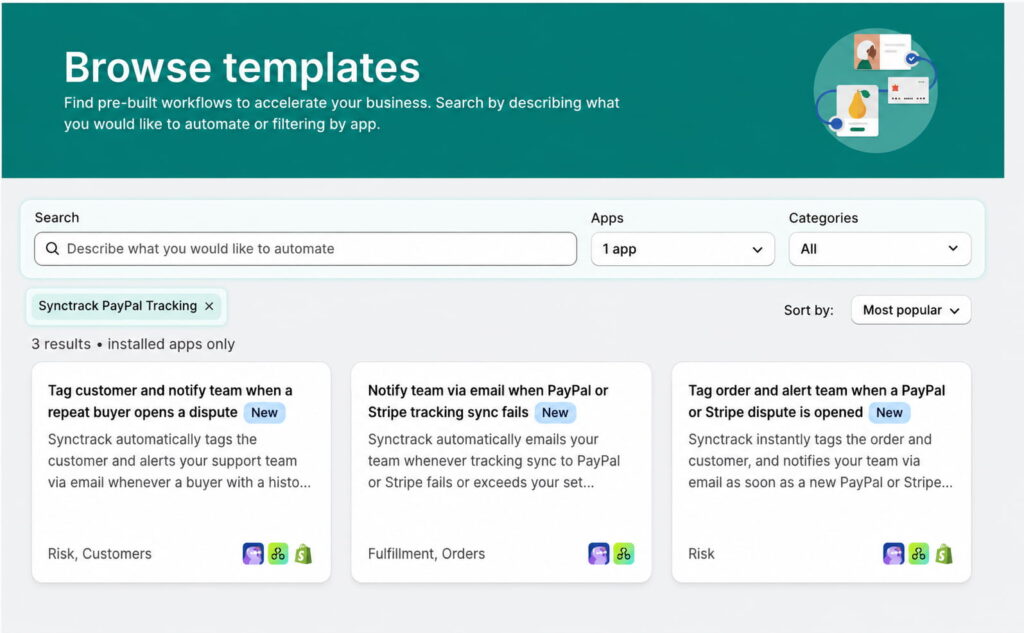
Synctrack PayPal now solves this with three ready-to-use templates for Shopify Flow. Instead of manual dashboard monitoring, these automations handle notifications, order tagging, and buyer flags the moment an issue requires attention.
3 Ready-Made Shopify Flow Templates for PayPal Disputes

Automate disputes with Flow

To get you running immediately without building workflows from scratch, Synctrack provides three pre-configured templates in the Shopify Flow library. Each handles a core dispute or tracking event automatically:

  • Instant Dispute Tagging & Email Alerts: When a dispute opens, Flow immediately tags the order and customer in Shopify, then emails your team with direct links to the case.
  • Pre-Fulfillment Repeat Disputer Flags: When a repeat disputer places an order, the customer is flagged right away – giving your team time to review the transaction before shipping.
  • Consolidated Sync Issue Digests: If tracking synchronization issues accumulate, Flow sends a single, quiet shop-level digest rather than flooding your inbox with individual error alerts.

Clearer Alerts and Faster Response Times

Every dispute alert clearly separates early customer inquiries from confirmed chargebacks, so your team knows which cases need formal evidence. Additionally, each notification links directly to the relevant dispute screen inside Synctrack, allowing your staff to submit documentation and respond well before the deadline.

The repeat-disputer alert leverages historical buyer dispute data tracked exclusively by Synctrack, alerting you to chronic chargeback risks that standard Shopify data cannot detect.

Why Automated Dispute Alerts Protect Your Store Operations

Relying on manual portal checks introduces unnecessary friction and costly delays. Automating dispute alerts directly inside Shopify Flow streamlines your workflow in two key ways:

  • Eliminate Default Chargeback Losses: Direct deep links and instant notifications ensure evidence is submitted on time, preventing lost disputes caused simply by missed deadlines.
  • Stop Risky Orders Before Fulfillments Ship: Flagging repeat disputers automatically gives fulfillment teams early notice to inspect high-risk orders before inventory leaves the door.

How to Launch Synctrack Dispute Templates in 5 Minutes

Setting up these automations takes just a few clicks inside your Shopify admin with no complex configuration required.

  1. Open the Flow Template Library: In your Shopify admin, open the Shopify Flow app and go to the template library.
  2. Search for Synctrack: Type “Synctrack” to display the available dispute and sync templates.
  3. Copy a Template: Select the template you want to use and copy it to your workflows.
  4. Enter Your Email & Activate: Add your team’s notification email address in the action card, then turn the workflow on.

Availability

These templates are available on all Synctrack PayPal plans, including the Free plan. Running the templates requires a Shopify Basic plan or higher to use Shopify Flow.


Joseph Nguyen AUTHOR

Founder of Synctrack & Blockify apps | eCommerce & Shopify


