Managing cross-border and regional returns across the Netherlands and Belgium often adds unnecessary friction to your post-purchase operations. When your logistics rely on intermediary aggregators just to pass label data back and forth, you introduce extra setup steps, potential sync delays, and additional overhead to everyday fulfillment tasks.
Synctrack Returns now connects directly with PostNL. Instead of routing through third-party platforms, you can link your own PostNL business account straight to your return workflow – instantly generating carrier labels and tracking information as soon as you approve a customer return.
This direct carrier release removes third-party dependencies and embeds native PostNL shipping tools directly into your merchant return dashboard.
Direct PostNL Carrier Connection: Link your existing PostNL business account using your production API credentials. You no longer need to route shipments through Sendcloud or manage multiple external shipping accounts.
Automated PostNL Label & Tracking Creation: Selecting PostNL during the return approval process automatically generates and attaches official PostNL shipping labels and tracking numbers to the return record.
Universal Merchant Availability: This integration is available across all Synctrack Returns plans without extra plan gating, specifically built for merchants shipping across the Netherlands and Belgium.
Direct carrier integrations resolve day-to-day operational friction, helping store teams process regional returns faster while maintaining consistent service levels.
Eliminate Third-Party Aggregator Overhead: Bypassing intermediate platforms means your store communicates directly with the PostNL logistics network, reducing third-party software dependencies and streamlining your technical stack.
Faster Return Processing Times: Automated label creation right at the point of return approval eliminates manual data entry and provides customers with return materials immediately, reducing status inquiry support tickets.
Preserve Contracted Business Rates: Connecting your direct credentials ensures that all generated return labels apply your specific commercial account terms and negotiated rates with PostNL.
Setting up the direct PostNL integration takes only a few minutes. Before you begin, verify that you have an active PostNL business account with API access enabled.
Log in to your business account on the PostNL Portal and open API Management. Copy your Customer Code, Customer Number, and Production API Key.
(Note: If the API Management menu is not visible in your portal, contact PostNL support to enable API access for your business account.)
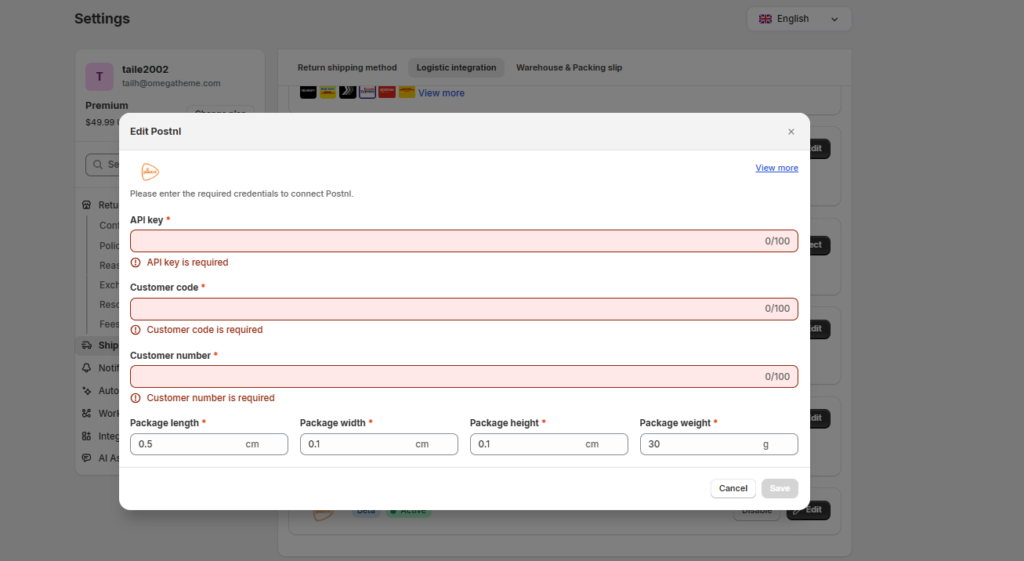
In your Synctrack dashboard, navigate to Settings → Shipping & Delivery → Logistics integration and click Connect next to PostNL. Paste your copied Customer Code, Customer Number, and Production API Key into the corresponding fields, then click Connect.
(Always use your Production API Key rather than a sandbox or test key so your return labels are valid for live shipments.)
When reviewing requests in Return management, approve the return and select PostNL as the return provider. Synctrack Returns will generate the official return label and tracking link automatically, attaching them directly to the return so the customer can ship the package back.
Eliminate third-party shipping aggregator bottlenecks and simplify return operations for your Dutch and Belgian customers.
Open your Synctrack Returns dashboard to configure your PostNL integration now. If you need assistance locating your API credentials, contact our support team via live chat or email for fast setup assistance.






