A blanket return policy forces Shopify merchants into an expensive compromise: either absorb every return shipping fee to maintain high customer satisfaction, or charge every customer a flat fee and risk driving away loyal shoppers who received defective items. When return logistics operate on a rigid, store-wide “Merchant Pays” or “Customer Pays” model, your profit margins suffer on discretionary returns, and customer goodwill erodes when store errors occur.
Synctrack Returns & Exchanges solves this trade-off with dynamic Return Shipping Label Fee Rules. Merchants can now automatically assign prepaid return shipping costs on a case-by-case basis. By setting granular conditions based on return reason, product tag, Shopify market, and order value, you ensure that shoppers never pay for store mistakes while your bottom line stays protected against elective buyer remorse.
Contents
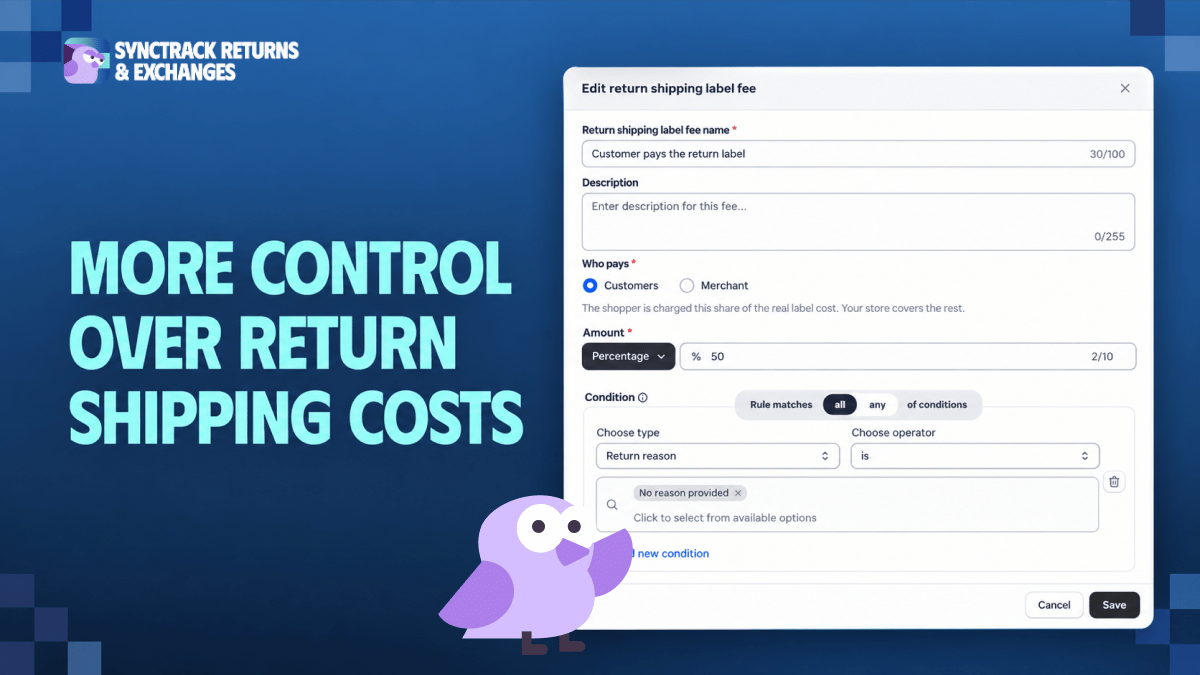
The new fee rules engine gives you complete control over how prepaid return label costs are deducted from a shopper’s refund during the return or exchange flow. Instead of applying a single store-wide setting, you can define conditional rules that allocate expenses dynamically between the shopper and your business.
Conditional Eligibility: Trigger rules automatically based on return reason, product tags, Shopify markets, return order value, and more.
Flexible Cost Sharing: Choose whether the Customer or Merchant pays, and configure the contribution as either a Percentage or a Fixed amount:
Customer + Percentage: The shopper covers that percentage of the actual carrier label cost.
Customer + Fixed: The shopper pays a set dollar amount regardless of final carrier rates.
Merchant + Percentage: Your store covers a specific share of the fee, deducting the remainder from the refund.
Merchant + Fixed: Your store covers up to a set amount; the shopper pays anything above it (if the label cost is at or below this threshold, the shopper pays nothing).
Automated Store Coverage Fallback: If a submitted return does not match any active conditional rule, your store covers the label by default, ensuring zero deduction from the shopper’s refund.
Prepaid Shipping Scope: Rules apply strictly to requests handled via the “Ship with pre-paid label” method. Other shipping methods are never charged a label fee.
Seamless Settings Migration: Existing store configurations have been converted into active rules automatically (Customer, 100% or Merchant, 100%). If prepaid labels were previously disabled, a deactivated default rule was generated. Your current store behavior remains unchanged until you create or edit rules.
Managing post-purchase logistics requires balancing cost control with exceptional customer retention. Implementing conditional return label fees directly removes operational friction and optimizes the financial efficiency of your reverse logistics.
You can configure and prioritize your return shipping label rules directly inside the Synctrack dashboard. Rules evaluate in descending order from top to bottom, meaning specific conditions should always be placed above general rules.
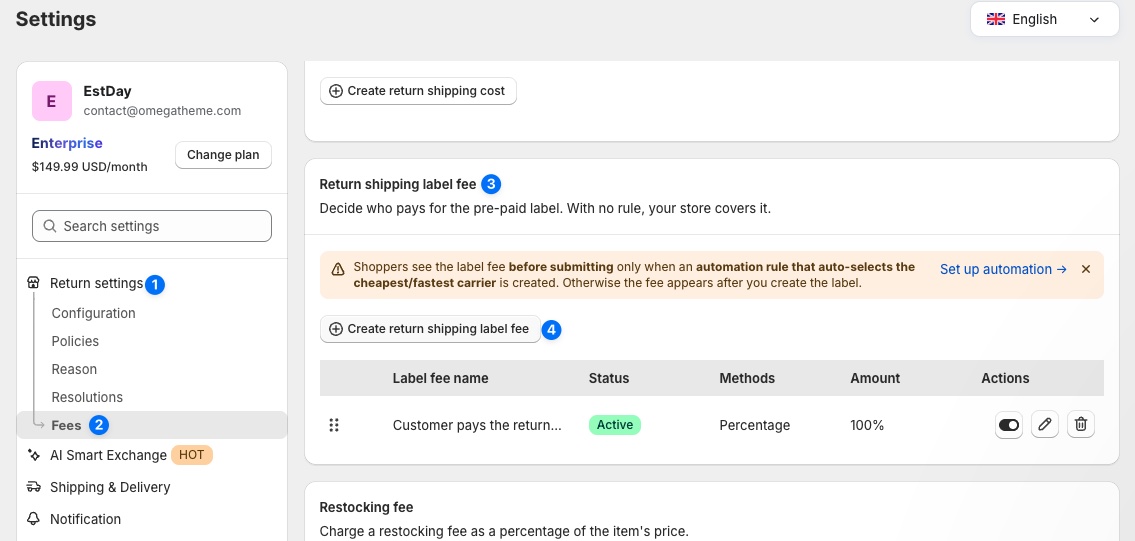
Follow these steps to configure your fee rules:
Access the Fee Settings:
In your Synctrack dashboard, navigate to Settings → Fees → Return shipping label fee → click Create the fee. (Alternatively, go to Settings → Shipping & Delivery → Return shipping method, enable Ship with pre-paid label, and click Set fee rules → in the Label fee row).
Define Who Pays and the Rate Structure:
Select either Customer or Merchant, then specify the allocation as a Percentage (e.g., 100% or 50%) or a Fixed amount (e.g., $5.00).
Configure Rule Conditions & Hierarchy:
Set specific criteria such as return reasons (e.g., Arrived damaged, Received wrong item, Defective), product tags, or Shopify markets. Name the rule descriptively (e.g., “Store covers damaged items”) for quick visibility.
Order Your Rule Priority:
Place conditional rules at the top of your list and position a catch-all rule with no conditions (e.g., “All other returns – Customer pays 100%”) at the bottom, ensuring every return is accounted for without blocking specialized rules.
Flexible return shipping label fee rules are now available across all plans for stores utilizing prepaid return labels. Upgrade your post-purchase strategy by aligning your shipping fees with real return scenarios.
Ready to set up your rules? Open your Synctrack Returns & Exchanges dashboard to get started, or reach out to our support team via live chat for assistance.






