Selling digital products through PayPal keeps growing for sellers all over the world. Ebooks, templates, online courses, software, photo presets, design files – you name it. But selling digital goods isn’t like selling physical products. It comes with its own set of rules, risks, and traps. If you don’t understand them, you can lose money fast, or worse, get your account locked.
This guide walks you through the most important things every merchant selling digital products on PayPal should know. We’ll cover seller protection, chargeback risk, how to sync tracking, the fees you’ll pay, and simple strategies to avoid disputes. Let’s get into it.
A digital product is anything you make, sell, and deliver online. There’s nothing physical to ship. Think PDFs, eBooks, audio files, video courses, design templates, software, plugins, printables, stock photos, and license keys.
PayPal treats these as “intangible” goods, and that label changes how your payments work. Here’s what that means for sellers:
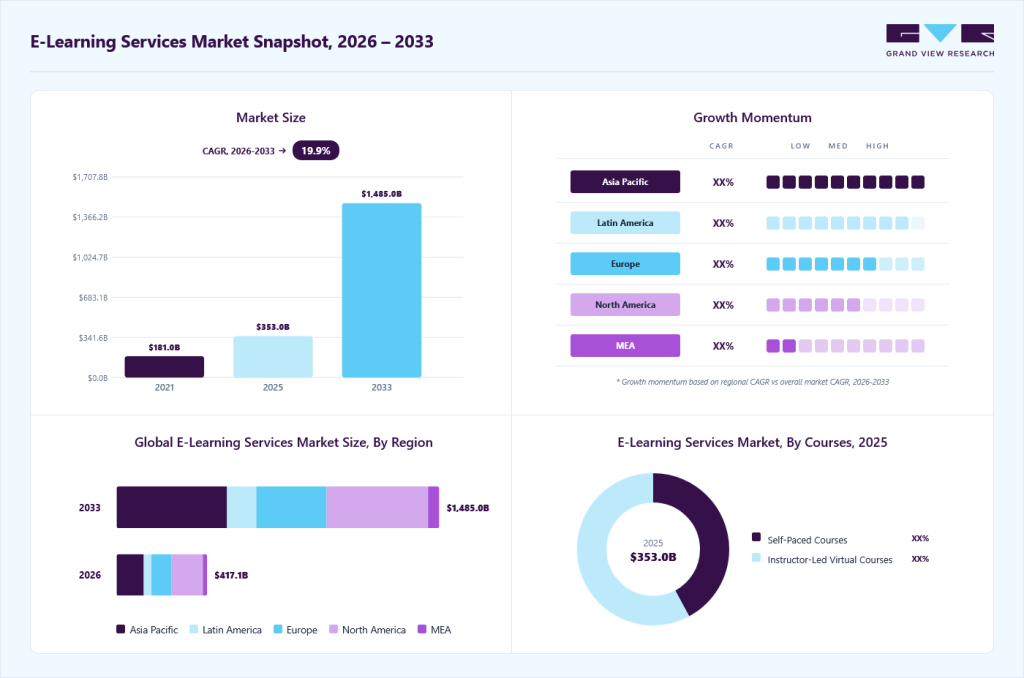
PayPal was built around physical shipping, so when you sell something digital, you have to prove delivery in a different way – usually by syncing order status automatically so PayPal sees each sale as fulfilled. Getting this right keeps your cash flowing and your account in good standing, and it’s worth the effort because the demand for digital products is real and growing fast. In fact, the e-learning and online course market is expected to surpass $417 billion in 2026, and the global eBook market is now valued at over $21 billion. There has never been a better time to start.
Selling digital products through PayPal isn’t quite like selling physical goods – the lack of a shipment changes how protection, disputes, and payouts all work. Before you start (or scale up), keep these seven things on your radar. Each one can quietly cost you money or put your account at risk if you overlook it.
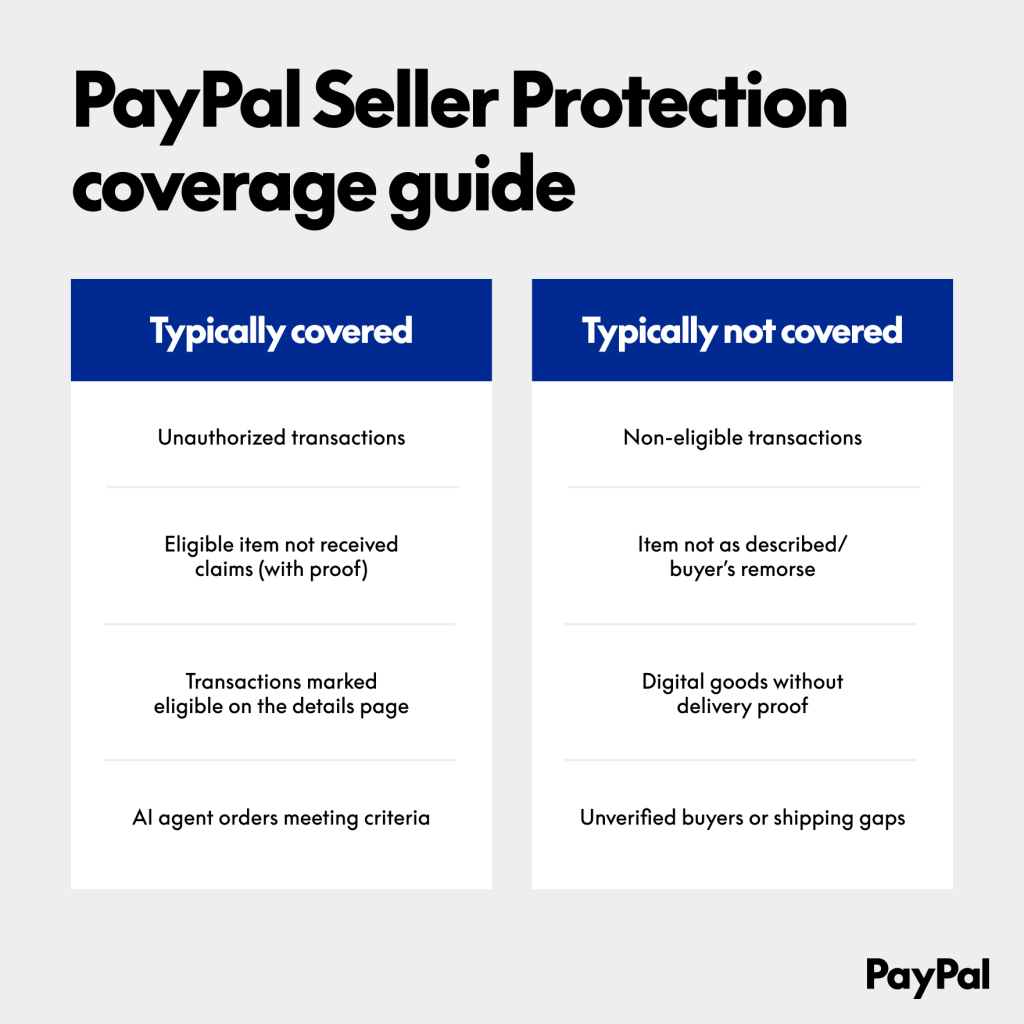
Before anything else, understand this: PayPal Seller Protection is not a safety net for digital goods. This single fact shapes every other decision you make.
For years, protection only covered physical items you could ship with a tracking number. PayPal added Seller Protection for intangible goods in September 2020, but it came wrapped in conditions. Today, a digital sale is only protected when it meets both of these at once:
Small note: One special case is the NFT. NFT sales over $10,000 are excluded from Seller Protection (effective May 2024), and NFT purchases no longer carry Buyer Protection – but NFTs are not a prohibited category.
Here’s the part that catches people off guard. Even with protection active, PayPal does not cover the most common digital disputes:
The takeaway: Seller Protection mainly guards against unauthorized transactions, where someone uses a buyer’s account without permission. For everything else, you protect yourself. The rest of this guide is how you do that.
You can’t fix a risk you don’t understand. Digital products get disputed more often than physical ones for a few built-in reasons:
Not all disputes are equal. Here’s how your odds look when you have no evidence prepared:
| Dispute Type | What It Means | Odds of Winning (No Evidence) |
| Item Not Received (INR) | Buyer says they never got it | Low |
| Significantly Not as Described (SNAD) | Product isn’t what was described | Very low |
| Unauthorized Transaction | Account used without permission | Medium (winnable with proof) |
| Card Issuer Chargeback | Filed straight with the bank | Low to medium |
The pattern is clear: without evidence, you lose. So evidence is where your defense begins.
Since PayPal won’t take your word for it, you need a record that proves every sale was delivered. The time to set this up is now- not when a dispute is already open. Strong proof for digital products includes:
One rule makes or breaks all of it: every piece of evidence must link to the buyer by name, email, PayPal Transaction ID, or Invoice ID. A generic log with no buyer details is useless.
And when a dispute does land, move fast. You get only 10 days before PayPal rules for the buyer automatically. Combine your documents into one PDF (max 19 pages, 4MB), name the file after the Dispute ID, and attach clear screenshots- a bare URL link usually won’t count.
A normal tracking sync app does one job: it pulls the tracking number from each Shopify order and pushes it to PayPal and Stripe. That works perfectly for physical goods, because every shipment has a tracking number to send.
But digital products don’t ship. There’s no parcel, no carrier, and no tracking number. So when the app looks at a digital order, it finds nothing to sync and quietly skips it – marking it with a NO_TRACKING status. The result is a stack of orders that PayPal never sees as fulfilled, which is exactly what leads to “Item Not Received” flags and held funds, even though you delivered the product instantly.
This is the piece most tracking apps leave out, and it’s where Synctrack PayPal Tracking Sync comes in.
When you turn the Digital Product Sync feature on, Synctrack looks for orders that don’t require shipping (requires_shipping = false) and sends them to PayPal marked as processed and complete– without faking a tracking number. To be clear about what this is: it’s an honest fulfillment signal, telling PayPal “this order is done,” not a shipping code pretending a package went out. That distinction matters because it keeps your account clean and compliant rather than gaming the system.
A few things worth knowing about how it works:
Here’s how to turn this feature on:
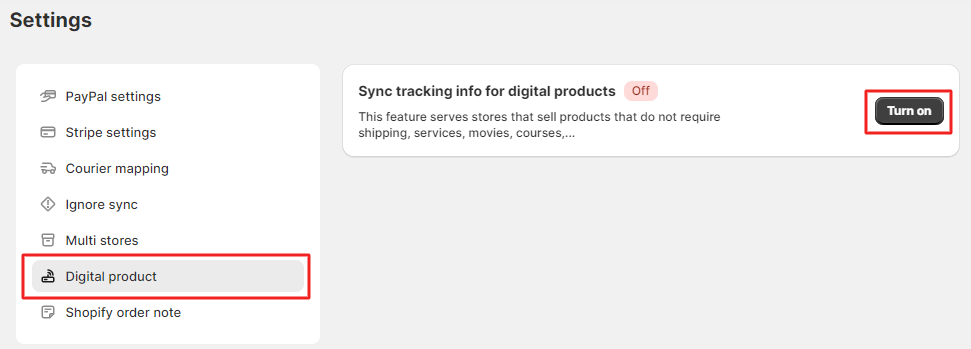


That’s it. From here, every digital order is automatically marked complete on PayPal- no manual updating, no overlooked sales.
Note: PayPal’s Seller Protection rules for digital goods change often and vary by region. Before relying on any specific policy detail, check PayPal’s current documentation.
The payoff is practical. Once digital orders are marked complete, PayPal stops flagging them as “missing tracking.” That means a cleaner account standing, fewer holds tied to unconfirmed delivery, and less friction when disputes come up. Instead of syncing only part of your orders, you reach 100% coverage – physical, digital, and pickup all accounted for.
Here’s what needs to be straight, because it affects how you protect yourself. Digital Product Sync marks orders as fulfilled, but it does not replace proof of delivery when a real dispute is filed.
There’s a technical reason for this. Synctrack can’t pull a customer’s download logs – Shopify’s API doesn’t expose them – and for privacy and security reasons, Synctrack deliberately does not collect or store sensitive buyer data like download timestamps, IP addresses, or login records. So if a buyer disputes a digital order, that evidence has to come from you, the merchant. When that happens, the app shifts into a manual flow that helps you attach the right kind of proof.
Overall, Synctrack covers the tracking side that other apps miss- keeping your digital orders marked complete and your PayPal account clean, with your own proof of delivery as the backup for disputes.
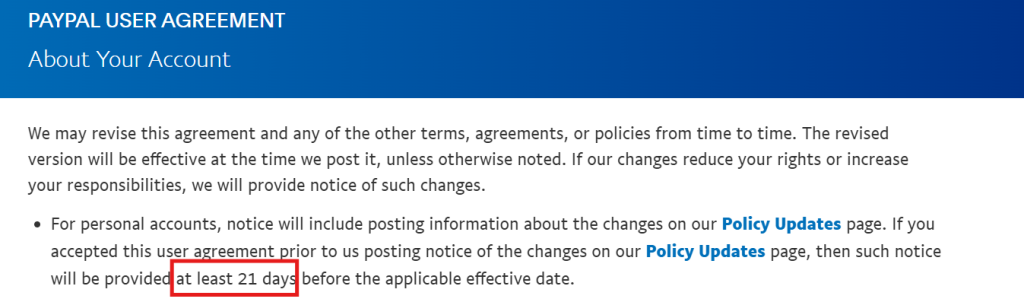
Even with tracking synced, new sellers should expect some holds early on. PayPal commonly holds funds up to 21 days on new accounts, accounts with past disputes, or risky categories – and digital products get caught here often because there’s no physical delivery to confirm.
On top of temporary holds, PayPal may add an account reserve:
| Reserve Type | What It Means | Example |
| Rolling Reserve | A percentage of each sale held, released on a schedule | 10% per sale, released after 90 days |
| Minimum Reserve | A minimum balance you must keep | Keep at least $5,000 |
| Jumpstart Reserve | A fixed amount held upfront | $3,000 held from the start |
Rolling reserve is the most common – often 10–20% held for 60-90 days. When money is on hold, you can speed up the release: open your Activity Feed and click into the transaction, mark it “Service Delivered” or “Order Processed” (PayPal usually releases after 7 days), ask the buyer to hit “Confirm Receipt,” and – most important – make sure your tracking is synced.
Holds get triggered by predictable things: a brand-new account, a dispute rate above 1%, a high-risk category, a sudden sales spike, or unresolved complaints. Avoid those triggers and your money moves faster.
Two things quietly damage digital sellers: fees they didn’t plan for, and selling something PayPal doesn’t allow.
On fees, here are the standard US rates:
| Payment Method | Fee |
| Standard PayPal Checkout (Express) | 3.49% + $0.49 |
| Standard Credit/Debit Card | 2.99% + $0.49 |
| Alternative Payment (Apple Pay, Google Pay) | 2.59% + $0.49 |
| Micropayments (small transactions) | 4.99% + $0.09 |
The hidden charges hurt more: a 1.50% cross-border fee on international sales, 4% currency conversion, a $20 chargeback fee, and a $15 dispute fee (or $30 for accounts with many disputes). For international buyers, your real cost can reach around 8% once these stack up, so build that into your pricing. And never use “Friends & Family” to dodge fees – it breaks the terms and erases your protection.
On banned products, PayPal’s Acceptable Use Policy is strict, and selling the wrong thing can get you locked out. Completely off-limits: adult content, anything involving children, hacking tools and malware, gambling products, and controlled substances. Other categories aren’t banned but are flagged high-risk – web hosting, subscription software, online coaching, and travel tickets – which can mean higher reserves. If you’re in one of these, contact PayPal yourself to confirm your category before a sudden limit hits.
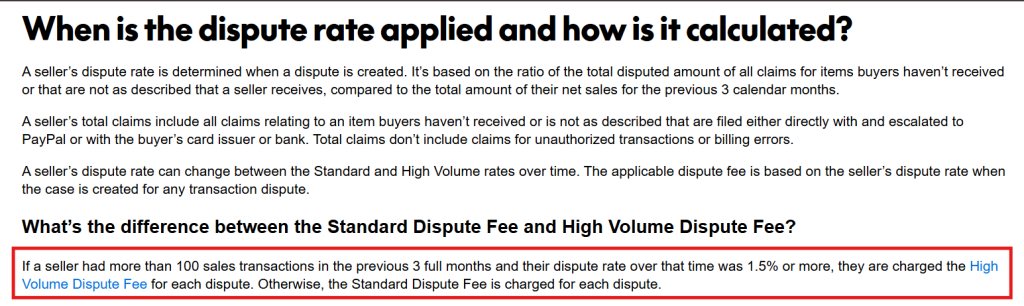
Everything above keeps your account alive. Accounts most often get limited for a dispute rate of 1.5% or higher (just 2 chargebacks in 100 sales), a sudden sales spike, breaking the use policy, mismatched details, running multiple accounts, or missing verification.
Here’s how to stay safe and build a stable business:
To stay protected, pair the feature with a few habits:
Together, with Synctrack’s Digital Product Sync keeps your everyday account clean, while your own delivery logs cover you in the rare case a buyer actually files a complaint.
Use this checklist as a quick gut-check before and after you start selling. Run through it whenever you set up your store or onboard a new product, and you’ll cover the essentials that keep your funds flowing and your account safe.
| Area | What to Do |
| Account | Use a PayPal Business account (not Personal), fill in your full business details, and verify your bank and email. |
| Delivery | Use a platform with automatic logging, send products to the buyer’s PayPal email, and set up confirmation emails. |
| Legal | Have clear terms and a refund policy, make buyers accept them at checkout, and describe products honestly. |
| Tracking | Turn on Sync Digital Products, process old orders, and confirm the “Synced” status on each order. |
| Monitoring | Check your dispute rate weekly, reply to tickets within 24 hours, and add a service message in the Resolution Center. |
Selling digital products through PayPal reaches a global market, but Seller Protection won’t shield you from the disputes that matter most. Your real protection is the system you build: full delivery logging, clear and honest terms, fast support, synced tracking on every order, and a backup gateway like Stripe. For Shopify merchants, a sync app like Synctrack does more than free up held funds. Over time, it builds your trust score with PayPal, lowers your reserve, and sets your store up for steady, long-term growth.
|
Stop letting digital orders sit unconfirmed on PayPal Flip on Digital Product Sync and every download, license key, and in-store pickup is marked complete on PayPal automatically. No faked tracking, no overlooked sales – just faster fund releases, fewer “missing tracking” holds, and 100% order coverage. |